FlexNet Embedded license client setup
- FlexNet Embedded license client setup
- Installing the FNE license client
- Uninstalling the FNE license client
- Enabling license logging
FlexNet Embedded license client setup
Subtopics
The FlexNet Embedded license client is required to run on the system controller (installed as default).
The FlexNet Embedded license client is installed as the default license client.
Information required to install, configure and administer FlexNet Embedded license clients is divided into the following areas:
- License client installation - Installation of the license client software to manage the licensing of a SmarTest software installation.
- Switching the client between FlexNet Embedded and FlexNet Publisher servers.
- License client administration - Advantest FlexNet Embedded (FNE) license client tools and their usage.
System controller prerequisites
- SmarTest 8.x
- The system controller fully-qualified hostname
Checking the connection to a customer-hosted FNE License Server
After installing the FNE license server, check that the FNE license server is contactable from the SmarTest workstation before you start the installation of the FNE client subsystem on the SmarTest workstation.
href="http://<fne-server-hostname>:7070/api/1.0/health <fne-server-hostname>
Complete the following procedure to check the connection to the FNE license server:
- Open a browser.
- Enter the URL appropriate for your FNE server arrangement:
-
href="http://<fne-server-hostname>:7070/api/1.0/health<fne-server-hostname>represents the hostname of the FNE license server to which you are testing the connection. -
href="http://<failover-fne-server-hostname>:7070/api/1.0/healthrepresents the hostname of the failover FNE license server to which you are testing the connection.
<failover-fne-server-hostname>
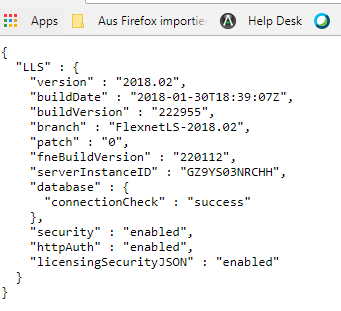
If the FNE license server is contactable (port 7070 is open), the following type of output is displayed:

-
- If port 7070 is not open, you a page with a not available message is displayed. In this case, get in contact with your administrators (customer IT) and request that port 7070 is opened for the SmarTest client workstation.
Installing the FNE license client
Installing a FlexNet Embedded license client used to provide the activated licenses to a SmarTest installation on a system controller workstation requires two steps: the installation of the license client software itself on the SmarTest host system, and configuration of the license server configuration file to prioritized the order of server access.
About this task
Installing the FNE license client (installed as default license client) also installs the FNE Server Viewer. For more details, see Monitoring license servers using the FNE Server Viewer.
The following procedure explains how to install the FlexNet client.
Before you begin
The license client is the SmarTest software. The FlexNet license server communicates with SmarTest using the FNE client.
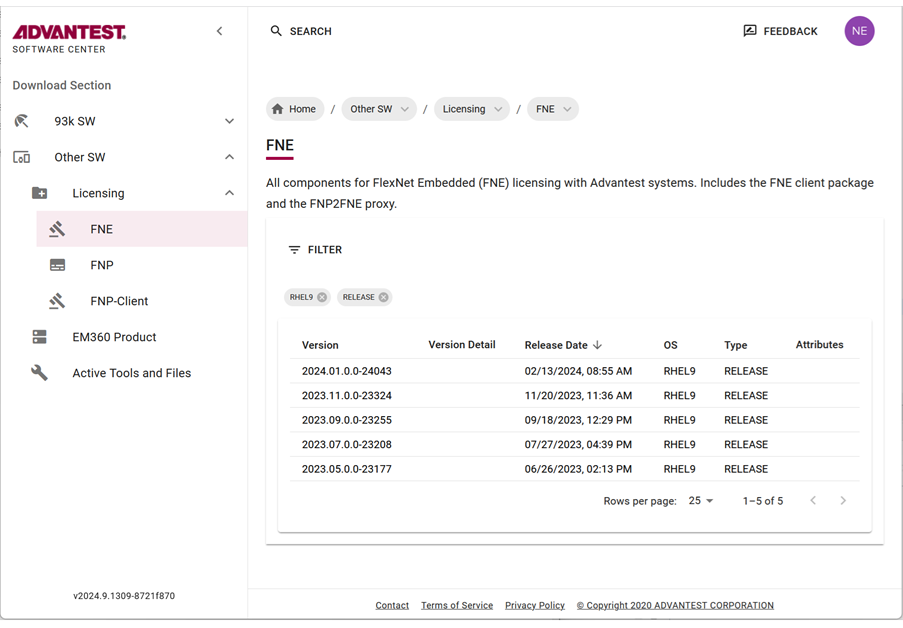
The license client install package can be downloaded from the FNE section of the Advantest Software Center:
https://softwarecenter.advantest.com/download/othersw/builds/licensing
The following procedure is applicable to installation, upgrades and updates.
Note: During upgrading and updating, the installation script can be called without any option. All installed packages are detected automatically and updated if applicable.
sudo sh install-fne-date-version.sh
Port 7070 must be open to the customer FNE license server and if needed to the cloud license server.
To check connection to your license servers, use the command:
If you are using the Advantest cloud license servers, check the connections by opening the following URLs:
- http://<license-server>:7070/ping
- https://<Device Owner FNE license server>.advantest.cloud:7070/ping
- https://<Device Owner FNE license server>-fo.advantest.cloud:7070/ping
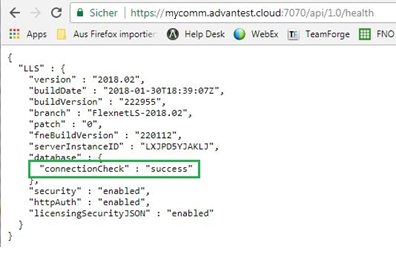
If port 7070 is open, the following type of output is displayed:
Procedure
- To get the list of all available Licensing products, from the left menu select:

- Download the archive package by clicking the
 icon.
icon.
The selected license (
tar.gz) package is downloaded to your browser's download folder.Example FNE packages include:
fne_2024.01.0.0-24043_rhel9.tar.gz

Results
You have installed the license client software and configured the list of FlexNet Embedded license servers in a prioritized order.
The order in which clients attempt to check out licenses is the same order in which the licenses are referenced in the client.conf file.
Example
Example of a client.conf file:
#Configuration of FNE servers to be used
# Emergency Server
include "/etc/fne/emergency.conf"
server
{
    name = "Local cloud space"
    url = "localcloud.company.com"
}
server
{
   name = "My cloud"
   selector = "DeviceOwner:MyCompany"
   url = "https://MyCompany.advantest.cloud:7070"
}
server
{
    name = "Local license server"
    primaryUrl = "fne1.company.com"
    failoverUrl = "fne2.company.com"
}
Minimum client.conf file configuration:
server
{
url = "localhost"
}
Uninstalling the FNE license client
Uninstalling the FNE license client is done manually using yum.
About this task
There are two options for uninstalling the FNE license client:
- Remove the FNE client only, which results in automatically switching back to using the FNP license client and FNP licensing.
- Completely remove the FNE client installation, which removes the license client, the FNE Server Viewer, and the
test_license_checkouttool.
Procedures
Uninstalling the FNE license client only
To remove the FNE client only, enter the command:
yum remove v93000-fne-client
Completely uninstalling the FNE license client and tools
To completely remove the FNE client installation, enter the command:
yum remove v93000-fne-client advantest-fne-server-viewer advantest-test_license_checkout
Results
FNE license client is no longer installed on the SmarTest system controller.
Enabling license logging
Subtopics
Detailed information about license consumption and optimize license usage can be identified by License usage logging.
About this task
To be able to get detailed information about license consumption and optimize license usage, it is necessary to analyze the licensing requirements for memory and speed for each measurement within a test program. From this information, it is then possible to isolate the main license requirements.
License usage logging (incremental over measurements and per measurement logging) provides the information required to establish the licensing dependencies. If the watermark increases in proportion to the measurement data, the test is independent, otherwise it shares data with other tests.
Log data is written to:
/opt/hp93000/soc/system/log/licenseUsage_<sessionId>.log
To read in the data you need to generate a parser based on protobuf library using the grammar in:
/opt/hp93000/soc/system/include/xoc/profiling/licenseUsage.proto
An existing file is not overwritten - only new data is appended to the existing content.
The most valuable data collected by license logging is when you have not previously executed an initial bind before executing the profile configuration. After an initial bind, only dynamic changes are recorded.
Before you begin
Make sure the test program has been loaded.
License logging can only be enabled using a Profile launch configuration.
Procedure
-
Select a test program or test flow in the Package Explorer view for which you want to enable license logging.
License logging is not available for encrypted testflows or test programs containing encrypted testflows.
-
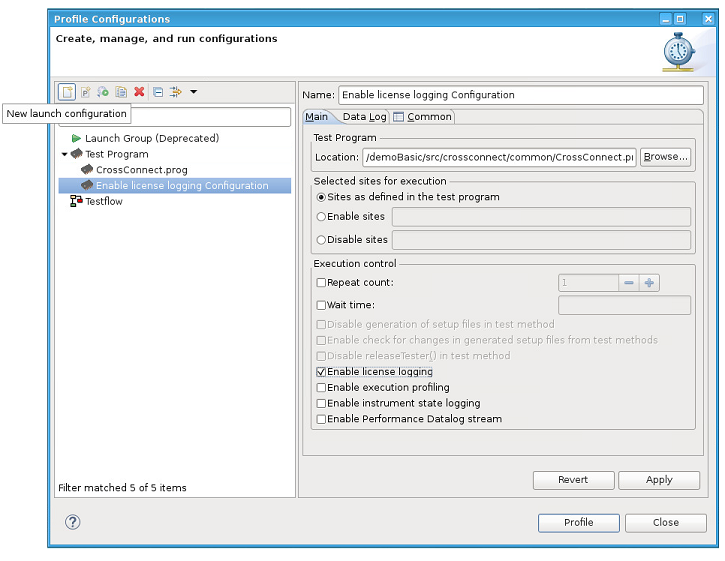
Open the Profile Configurations dialog from the context menu:
-
Select Test Program from the objects pane on the left.
-
Click the New Launch Configuration
 button.
 -
Enter a name for the new profile configuration in the configuration pane on the right.
-
In the Main tab (default selection), select Enable license logging.

-
Specify any other required configurations. For details, see Creating a run configuration for running test programs or testflows.
-
Click Apply to save the profile configuration.
-
Click Profile to profile the test flow or Close to close the Profile Configurations dialog box.

Results
License logging is enabled.
Log data is written to /opt/hp93000/soc/system/log/licenseUsage_<sessionId>.log.
A license usage log file contains the memory contribution (in Bytes) for each signal for each measurement.
Note: License logging can also be enabled and disabled using the Test Cell API. For example:TestProgramConfig config;config.enableLicenseLogging = true;testProgram.loadWithConfig(config);
For details about TestProgramConfig, see TestProgramConfig.
What to do next
The generated log file is user-readable and it is possible to manually extract the licensing requirements for memory and speed for each measurement within a test program. It is not essential to parse this file.
However, for further processing, it can be beneficial to parse the file to arrange its content into a more readable format.
To read in the data you can generate a parser based on the protobuf library using the grammar in:
/opt/hp93000/soc/system/include/xoc/profiling/licenseUsage.proto
Reading log file data
1) Log file data contains information, such as memory usage.
About this task
If license logging is enabled, the license log data is written to:/opt/hp93000/soc/system/log/licenseUsage_<sessionId>.log.
The following log example shows the used memory (Pattern or PA = 1032 bytes) for the signal D04. The total accumulated value (accDoubleValue) is 3096 bytes which the total memory used by the complete program.
LicenseUsage.log file example:
measurementName: "Main.GlobalPAPattern.measurement"
measurementTimestamp: "Mon, 01 Jul 2019 15:30:08 -0700"
licensedFeatureLog {
featurePerSignal {
signalList: "D00 + D01 + D02 + D03 + D04"
feature {
feature: "speed"
accDoubleValue: 10000000
unit: "bps"
}
}
featurePerSignal {
signalList: "D04"
feature {
feature: "memory"
accDoubleValue: 3096
doubleValue: 1032
unit: "B"
}
feature {
feature: "sharedMemory"
doubleValue: 60352
unit: "B"
}
}
}
In the example above:
| Measurement | Main.GlobalPAPattern.measurement |
| Signal names | signal_list: "D00 + D01 + D02 + D03 + D04" |
| Signal requirement type |
feature: speed (all signals) feature: memory (signal D04) feature: sharedMemory (signal D04) |
| Accumulated speed value | accDoubleValue: 10000000 bps (all signals) |
| Accumulated memory value | acc_double_value: 3096 B (signal D04) |
| Memory value | doubleValue: 1032 B (signal D04) |
| Shared memory value | doubleValue: 60352 B (signal D04) |
Note: If you only require the values for a specific measurement, you can read this from the ASCII text manually.
TestProgramConfig config;
config.enableLicenseLogging = true;
testProgram.loadWithConfig(config);
/usr/bin/protoc
The protoc version can be found with the command:/usr/bin/protoc --version
Output example: libprotoc 2.5.0
To structure information, protocol buffer message types are defined in .proto files. The following protobuf file is used for license logging, which can be compiled with the protocol buffer compiler to Java, Python, Objective-C, or C++.
-
Before you begin
- Make sure that license logging is enabled. For details, see Enabling license logging.
Procedure
- Create a parser file, for an example, see Example logfile parser.
-
For example, to compile to C++ with the protocol buffer compiler, run the following commands or a make.sh script containing the commands:
protoc -I=/opt/hp93000/soc/system/include/xoc/profiling/ --cpp_out=./opt/hp93000/soc/system/include/xoc/ profiling/licenseUsage.protoc++ -std=c++11 -g -L/usr/local/lib -lprotobuf -o licenseLogger licenseUsage.pb.cc main.cppThe generated C++ class is used to simplify the parser implementation.
./licenseLogger licenseUsage.log memory D04
Analysing: licenseUsage.log memory D04
Top 20 measurement runs for feature "memory" at signal "D04"
Measurement Run                   | Value    |Watermark Value
----------------------------------+----------+-----------------------
Main.GlobalPAPattern2.measurement | 1032.000 | 3096.000
Results
After the above protoc call or make.sh script is run, the following files are created:
- licenseLogger
- Generated Parser Executable To execute the licenseLogger, use the command:
./licenseLogger <output_file_name> <license_type> <signal>For example:
./licenseLogger <kbd class="userinput">licenseUsage.log memory D01 - measurementLicense.pb.cc
- Generated after running protobuf compiler
- measurementLicense.pb.h
- Generated after running protobuf compiler
Example logfile parser
1) The following code is an example parser for reading license log files and printing the top 10 measurement executions contributing to the specified feature and signal.
Example parser (SmarTest ≥ 8.2.0)
#include <iostream>
#include <fcntl.h>
#include <fstream>
#include <google/protobuf/text_format.h>
#include <google/protobuf/io/zero_copy_stream_impl.h>
#include <map>
#include <iostream>
#include <iomanip>
#include <sstream>
#include "licenseUsage.pb.h"

using namespace std;
using namespace license;
using namespace ::google::protobuf::io;
using ::google::protobuf::TextFormat;

map<double,string> featureValuePerMeasurement;
map<string,double> featureValuePerMeasurementWatermark;

//  measurementName, <license string, count>
multimap<string, pair<string,int> > licenseUsage;

// utility to extract signal from signal list into a vector of signals
vector<string> signalsToVector(string& signals)
{
 vector<string> items;
     const char* t = " \t\n\r\f\v";
     unsigned long opos = 0;
     unsigned long pos = signals.find_first_of(" + ");
     while (true) {

          // trim white spaces
          string extract = signals.substr(opos, pos - opos);
          extract.erase(0, extract.find_first_not_of(t));
          extract.erase(extract.find_last_not_of(t) + 1);

          items.push_back(extract);
          if (string::npos == pos) { break; }
          pos = signals.find_first_of(" + ", opos = pos + 1);
     }

 return items;
}

// Sample method to print Top 20 measurement runs for given feature and signal
// In addition print the license usage after the Top1 measurement was executed.
void printTop20(string& featureKey, string& sigKey)
{
 int x = 0;
     int mrlen = 0;
     for(auto elem = featureValuePerMeasurement.rbegin();elem != featureValuePerMeasurement.rend() && x < 20; ++elem, ++x) {
      if(elem->second.size() > mrlen) { mrlen = elem->second.size();  }
     }

     cout << "Top 20 measurement runs for feature \"" << featureKey << "\" at signal \"" << sigKey << "\"" << endl << endl;
     cout << setw(mrlen) << left << "Measurement Run" << " |  Value       | Watermark Value " << endl;
     for(int i=0;i<mrlen;++i) { cout << "-"; }
     cout << "-+--------------+-----------------------" << endl;
     x=0;
     for(auto elem = featureValuePerMeasurement.rbegin();elem != featureValuePerMeasurement.rend() && x < 20; ++elem, ++x) {
     cout << fixed << setw(mrlen) << elem->second << " | " << setw(12) << left << setprecision(3) << elem->first << " | " << setprecision(3) << featureValuePerMeasurementWatermark[elem->second] << endl;
     }

     cout << endl << endl;
     string mrName = featureValuePerMeasurement.rbegin()->second;
     auto elements = licenseUsage.equal_range(mrName);
     auto elem = elements.first;
     for(;elem != elements.second; ++elem) {
     cout << "Count: "<< setw(6) << elem->second.second <<elem->second.first << endl;
     }

}

bool processMessage(string& message, string featureKey, string sigKey)
{
     license::MeasurementLicense log;

     if (!TextFormat::ParseFromString(message, &log)) {
          cerr << endl << "Failed to parse string: " << endl;
          return false;
     }

     string mrName = log.measurementname();
     LicensedFeatureLog feature = log.licensedfeaturelog();
     for(int i=0; i<feature.featurepersignal_size();++i) {
          FeaturePerSignal fps = feature.featurepersignal(i);
          string signals = fps.signallist();
          vector<string> signalVector = signalsToVector(signals);
          for(int x=0;x<fps.feature_size();++x) {
           Feature f = fps.feature(x);
           if(f.feature() == featureKey) {
            for(auto const & sig : signalVector) {
             if(sig == sigKey) {
              featureValuePerMeasurementWatermark[mrName] = f.accdoublevalue();
              featureValuePerMeasurement[f.doublevalue()] = mrName;
             }
            }
           }
      }
 }

     for(int i=0;i<log.licenses_size();++i) {
     auto l = log.licenses(i);
     for(int x=0; x<l.licensestring_size();++x) {
          auto ls = l.licensestring(x);
          licenseUsage.insert(make_pair(mrName,make_pair(ls.name(), ls.count())));
     }
}

 return true;
}

int main(int argc, char** argv)
{
     if (argc != 4) {
          printf("wrong arguments, ussage: licenseLogger featureKey sigKey\n");
          exit (1);
     }

     ifstream file(argv[1]);
     string featureKey = string(argv[2]);
     string sigKey = string(argv[3]);
     string str, message;

     printf("Analysing: %s %s %s\n", argv[1], argv[2], argv[3]);

     getline(file, message);

     while (getline(file, str)) {
          if(str.size() > 16 && str.substr(0,16).compare("measurementName:") == 0) {
       if(!processMessage(message, featureKey, sigKey)) { exit(-1); }
       message = str;
       continue;
          }
          message += str;
     }

     printTop20(featureKey, sigKey);
}