# FNE and FNX
# SmarTest Client Information
# What is multi-dimensional locking, which FNE supports
**With FNP** licenses can only be locked to a HOSTID or a system serial number. The locking to the HOSTID is not used anymore.
**With FNE** it is also possible to lock the licenses e.g. to the upstream of a device, to device categories, the downstream company, … This is meant with multi-dimensional locking.
So it is possible to limit a license to a specific device with FNE.
# What are the connection times between client and license server for FNE and FNP?
**An FNE client** connects to the FNE license server every 20 minutes. And if the connection fails another FNE license server can be connected (if defined in `/etc/fne/client.conf`) to get the same license.
**An FNP client** tries to connect to the FNP license server every 2 minutes. When this connection fails SmarTest starts the grace period and shuts down at the end of the grace period, if a reconnection to the same FNP license server is not possible.
# How does SmarTest read the client.conf configuration file?
#### **Explanation on FNE license check-out behavior / order for FNE servers defined in the *client.conf* file**
#### **Q1:** If two servers are defined in the client.conf file, is there any order where the licenses got checked out?
The sequence is down **top down**, so first entry gets queried first and if the license is not available, the next entry in line will be queried.
#### **Q2:** Or are both servers always queried?
If the response from the first entry is positive and the license is checked out, there is no additional query to other servers.
#### **Q3:** Is there any technical reason why ELF lics seems to be checked out preferentially?
They are preferred due to the **FULL\_CAPABILITY license**. If any **FULL\_CAPABILITY** licenses is found, this lic will get checked out with priority, even if it's from the second server
# Installation and Administration FNE/FNX server
[How to check if the FNE server is running](https://lhc.advantest.com/books/fne-and-fnx/page/how-to-check-if-the-fne-server-is-running)
[FNX proxy setup questions](https://lhc.advantest.com/books/fne-and-fnx/page/fnx-proxy-setup-questions)
[Terminal commands questions](https://lhc.advantest.com/books/fne-and-fnx/page/terminal-commands-questions)
- Which FNE commands are available?
- How do I get a list of FNE licenses available on my FNE license server?
- How to set up a simple hostname- fne-failover-setup ERROR: The simple hostname (<hostname>) may not contain dots
# How to check if the FNE server is running
You can check the following:
1. [Is the FNE server running?](https://lhc.advantest.com/link/20#bkmrk-1.-is-the-fne-server)
Note: if you have an **FNE failover setup**, you need to check this both for the **FNE primary and the FNE failover** servers.
Note: Using both tools provided in the sections "1. Is the FNE server running" and "2. Are licenses provided?" below, your customer can use a monitoring tool to check, if the FNE license server(s) are okay and providing licenses.
3. [For failover setup: when is the maintenance end reached?](https://lhc.advantest.com/link/20#bkmrk-3.-for-failover-setu)
This is an **optional check**, for the case you want to know when the maintenance end is reached by the failover, when the primary server is down.
---
### 1. Is the FNE server running?
If you want to check, if the FNE server is running, you can use the :7070/ping REST API. In a browser enter
```
http://:7070/ping
```
For a **failover setup** you have to do this for the **primary and** the **failover** FNE server!
Output in the browser, if the server is running:
[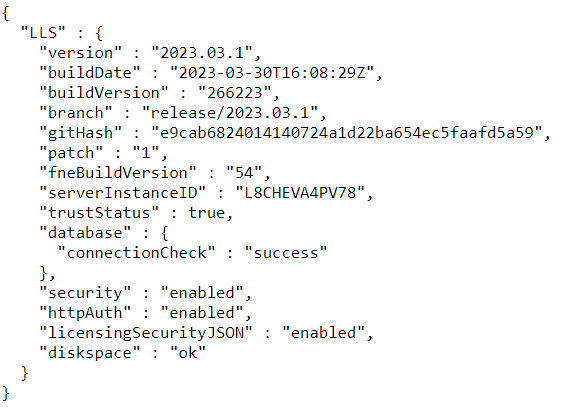](https://lhc.advantest.com/uploads/images/gallery/2025-10/scaled-1680-/new1-png.png)
If it is not working, then you get an error page.
### 2. Are licenses provided?
Note: the tool `test_license_checkout `can be used **after** FNE server registration.
In order to check, if the license checkout is working, you should use the tool `test_license_checkout`, which is also available on the FNE license server. Just checkout the dummy license with
```
test_license_checkout -f dummy -t 0
```
Example for a successful checkout:
[](https://lhc.advantest.com/uploads/images/gallery/2025-10/scaled-1680-/new2-png.png)
Check for the "OK 1 x dummy" line. If it is available, the checkout was successful.
### 3. For failover setup: when is the maintenance end reached
With the following command executed on the failover server you can get the date/time when the maintenance of the failover ends.
```
/opt/flexnetls/socbu/fne-get-config -1 maintenanceEndTime
```
If you get as output
`1970-01-01T00:00:00.000Z`
then the failover is not (yet) active.Example output for an active failover executed on August 7th, showing that the maintenance will end on August 17th:
`2023-08-17T13:02:28.000Z`
# FNX proxy setup questions
Installation questions
If option fnx is used, why is also v93000-fne-client installed?
The fne-client is part of the license software (The client needs to correctly configure the configuration file /etc/fne/client.conf before establishing the connection to the server.).
How to check if proxy related packages are installed or not?
The fne-status command gives you a list of installed packages (requires advantest-fne-server package to be installed).
Are the hostnames for command fne-proxy-setup case-sensitive?
Yes. For example if the hostnames of the second license server is HostX2 and for the third license server is HostY3 then you need to enter the following command for setting up the proxy connection on the primary server.
/opt/flexlm/bin/fne-proxy-setup HostX2 HostY3
The hostnames are case-sensitive here. So you need to take care to use the correct upper and lower letters.
Option file usage information with FNX
With FNX environemnt, FNP clients can use an option file as for FNP. There are two important differences:
The option file is only valid for FNP-clients.
Please put the option file to folder /opt/flexlm/bin. Ideally you use the default option file name socbu.opt. If you do not use the default name, you need to define the name in license file proxy.lic in folder /opt/flexlm/bin as known for FNP.
If the FNE proxy already runs and you installed a new option file or changed an option file you need to restart the proxy with
sudo systemctl restart advantest-fne-proxy
to make the new / changed option file effective.
Problem with using MAX 0 in option file - Message "FATAL ... internal error" in the license server log file
Do not use MAX 0 in the option file but use the EXCLUDE keyword.
Reason: if you use MAX 0 in the option file you will get a "FATAL ... internal error" error message in the log file with trying to checkout this license with the user / host which shall not be able to do it. In this case the search algorithm tries to check out -1 licenses and fails and therefore the "FATAL ... internal error" is written to the log file.
Positive is that the license cannot be checked out as defined with the option file. Therefore, the functionality is working, but there are unnecessary and incomprehensible error messages in the log file.
The use of EXCLUDE instead prevents these error messages.
# Terminal commands questions
##### Subtopics
- [What FNE commands are available?](https://lhc.advantest.com/link/22#bkmrk-which-fne-commands-a-1)
- [How do I get a list of FNE licenses available on my FNE license server?](https://lhc.advantest.com/link/22#bkmrk-how-do-i-get-a-list-)
- [How to set up a simple hostname- fne-failover-setup ERROR: The simple hostname (<hostname>) may not contain dots](https://lhc.advantest.com/link/22#bkmrk-how-to-set-up-a-simp)
### What FNE commands are available?
[FlexNet Embedded license administration](https://lhc.advantest.com/books/flexnet-embedded-licensing/chapter/flexnet-embedded-license-administration "FlexNet Embedded license administration")
### How do I get a list of FNE licenses available on my FNE license server?
You can use the **FNE server viewer > Features.**
Alternatively you can use the command `fne-list-licenses`
There are a bunch of options like providing the output with a separator like comma possible, please check with **`man fne-list-licenses`** the manual page.
**Examples**:
Without any options you get all licenses:
[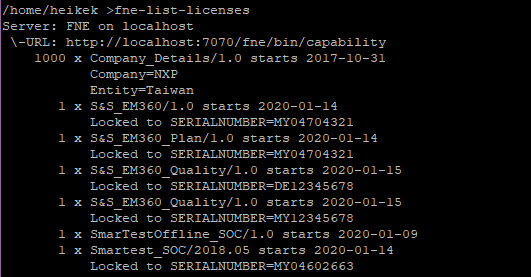](https://lhc.advantest.com/uploads/images/gallery/2025-10/scaled-1680-/1XA3-png.png)
With option --feature you can look up a special license:
[](https://lhc.advantest.com/uploads/images/gallery/2025-10/scaled-1680-/tsM4-png.png)
Features are case-sensitive. If you enter fne-list-licenses --feature=smartest you will not get an output.
See the manual page for more examples.
### How to set up a simple hostname - fne-failover-setup ERROR: The simple hostname (<*hostname*>) may not contain dots
if you enter the command `hostnamectl status`
you should get for the simple/**static** hostname only the simple hostname like licfne01 on the appropriate server.  The simple/static hostname must not contain a dot when setting up an FNE failover setup. Example for a good output:
[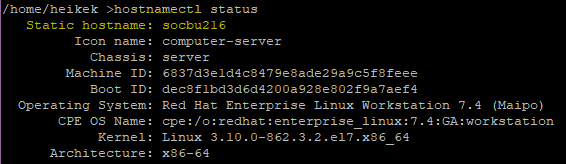](https://lhc.advantest.com/uploads/images/gallery/2025-10/scaled-1680-/SaG5-png.png)
In the screenshot above the simple/static hostname is socbu216 only.
If there is a dot in the simple hostname, then you can change it with **`hostnamectl set-hostname `**
Check with command `hostnamectl status`
afterwards, if the name changed. Please also check, that the fully qualified hostname is still available with `hostname -f`
Example for good hostname -**f** output:
[](https://lhc.advantest.com/uploads/images/gallery/2025-10/scaled-1680-/l3I6-png.png)
Note: Do not use localhost or localhost.localdomain as hostname for an FNE license server!
# What is the IP address of the Advantest Licensing Back-Office (license.advantest.com/FNO)
Do not use the IP address to allow the access to the Advantest Licensing Back-Office at license.advantest.com. Instead of that please use DNS to allow the access to [license.advantest.com](http://license.advantest.com "http://license.advantest.com").
Reason is that in January 2026 the IP address will not be fix anymore because of various reasons like using Akamai WAF for [license.advantest.com](http://license.advantest.com) (Akamai WAF is a security solution that protects web applications from online threats).
The formerly used fix IP address 8.31.43.39 for license.advantest.com shall not be used for example at the customer firewall or in file /etc/hosts anymore starting with January 2026.
# Can I run FNP and FNE license server on one server
This is **not possible**. You need to de-install the FNP license server in order to run an FNE license server and vice-versa.
# Can I use a VM for FNE or FNX license server setup
Yes, **this is possible**. The hardware / software prerequisites and the installation setup is the same for VM as for bare metal servers.
(see LHC chapter of [FlexNet Embedded license server setup - Prerequisites](https://lhc.advantest.com/link/65#bkmrk-page-title) for the prerequisites and subchapters / links for the installation set up).
Only if you have a local license server serving only the local SmarTest client, then the hard disk space can be less.
Z4G5 is only allow one instance for local FNE/FNX license server: either on the HV instance or on the bare metal instance; parallel installation will corrupt database.
**Note**: if you have a failover FNE setup or a triad FNX server setup it is risky to use the VMs available on the same server. If this server goes down, all VMs go down.
# Can I use another port than 7070 for the FNE server
Yes, **this is possible** since FNE software 2022.04.0.0/2019.07.1.0-22144. You can change the port in file
**`/etc/systemd/system/advantest-fne-server.service.d/flexnetls-socbu.conf`**,
edit
**`Environment=PORT=7070.`**
**Note**: However, initial installation must ensure port 7070 is open. The port number can be modified after initial installation is complete.
**Note**: you need to take care that the new port is also opened in the firewall of the server.
# Can I use another port than 7077 for the FNE server viewer
No. This port is fixed.
# Can I use another port for the proxy server
**Note**: The license files for the proxy are in folder `/opt/flexlm/bin`. There are two license files: `atflexd-proxy.lic` and `proxy.lic`. Via these license files the license server process `lmgrd` starts two vendor daemons:
1. **`atflexd`** for the T2K licenses
2. **`socbu`** for the 93k licenses
If the customer wants to use another port for the `lmgrd` process of the proxy server or another port for the `socbu` / `atflexd `vendor daemon, then the files in folder `/opt/flexlm/bin`
- `atflexd-proxy.lic`
- `proxy.lic`
need to be adapted with the appropriate port number on the SERVER line(s) for the lmgrd process and on the VENDOR line for the appropriate vendor daemon process on all used proxy license servers. So if the setup is an FNX triad, the port numbers need to be adapted on all three license servers.
Please always adapt both license files. The license server will run into errors, if you use for example different port numbers for the `lmgrd` process in file `proxy.lic` than in `atflexd-proxy.lic`.
# How to make an online FNE server offline
Add the following line to `/etc/hosts` on the FNE license server at the end of the file:
**0.0.0.0 license.advantest.com**
**Note**: the line 0.0.0.0 license.advantest.com is sometimes not working because of individual customer IT setup. Then you need to talk to customer ID.
# No active time synchronization daemon found on this system (ntpd/chrony)
NTPD:
Make sure the service is running.
Chrony:
Un-comment the line "local stratum 10" in the `/etc/chrony.conf` and restart `chrony` service
Reference:
[Configuration about ntpd/chronyd](https://lhc.advantest.com/books/general-license-questions/page/operating-system "Operating System")
# RHEL9 upgrade and the licensing software - recommendation for existing setups
In any case using a emergency standby license server is advised to ease the process of upgrading the setup.
Please be reminded, that an emergency server is mandatory for any FNE/X related setup.
For upgrading from RHEL7 to RHEL9 and how to handle the licensing software on single/standalone FNE server:
1\. uninstall licensing software while OS is still RHEL7
1.1 With release 2023.11.0.0-23324 and newer use:
```
sudo sh install-fne- uninstall
```
1.2 For older releases find the installed packages (`rpms`) with **`fne-status`** command under Installed components
1.3 Use the list entries with: (example)
```
sudo yum remove advantest-fne-server advantest-fne-server-viewer
```
2\. update OS to RHEL9
3\. download and install latest FNE software
```
sudo sh install-fne-2024.01.0.0-24043-rhel9.sh server
```
for a proxy setup use `fnx` instead of `server`
This would obviously mean some downtime if there is no failover/backup or emergency standby server in place.
***An emergency server is mandatory and set up will prevent any downtime.***
For upgrading from RHEL 7 to RHEL 9 and how to handle the licensing software with a failover setup and triad setup:
Failover setup must be in place beforehand! It cannot be added afterwards without a completely new setup including the registration for the back office.
**On Primary server:**
1\. uninstall licensing software while OS is still RHEL7
1.1 With release 2023.11.0.0-23324 and newer use:
```
sudo sh install-fne- uninstall
```
1.2 For older releases find the installed packages (**`rpms`**) with **`fne-status`** command under Installed components
1.3 Use the list entries with: (example)
```
sudo yum remove advantest-fne-server advantest-fne-server-viewer
```
2\. update OS to RHEL9
3\. download and install latest FNE software
```
sudo sh install-fne-2024.01.0.0-24043-rhel9.sh server
```
for a proxy setup use `fnx` instead of `server`
4\. run as normal user
```
fne-failover-setup repair primary
```
During primary downtime the clients will switch to the failover.
Once the primary is finished upgrading and has a running licensing software, clients will automatically reconnect to primary within 2-20mins.
**On Failover server:**
1\. uninstall licensing software while OS is still RHEL7
1.1 With release 2023.11.0.0-23324 and newer use:
```
sudo sh install-fne- uninstall
```
1.2 For older releases find the installed packages (rpm's) with `fne-status` command under Installed components
1.3 Use the list entries with: (example)
```
sudo yum remove advantest-fne-server advantest-fne-server-viewer
```
2\. update OS to RHEL9
3\. download and install latest FNE software
```
sudo sh install-fne-2024.01.0.0-24043-rhel9.sh server
```
for a proxy setup use **fnx** instead of **server**
4\. run on primary as normal user!
```
fne-failover-setup repair failover
```
HostIDs of primary and failover servers must not be changed!
**On Tertiary server:**
1\. uninstall licensing software while OS is still RHEL7
1.1 With release 2023.11.0.0-23324 and newer use:
```
sudo sh install-fne- uninstall
```
1.2 For older releases find the installed packages (rpms)
```
rpm -qa | grep fne-proxy
```
1.3 Use the list entries with this command: (example)
```
sudo yum remove advantest-fne-proxy advantest-fne-proxy-base advantest-fne-proxy-features
```
2\. update OS to RHEL9
3\. download and install latest FNE software
```
sudo sh install-fne-2024.01.0.0-24043-rhel9.sh tertiary
```
**Afterwards the proxy setup can be run on primary:**
```
/opt/flexlm/bin/fne-proxy-setup
```
**Important links:**
Softwarecenter Download FNE licensing software
[https://softwarecenter.advantest.com/download/93ksw/builds/smartestaddons/smartestaddons:fne](https://softwarecenter.advantest.com/download/93ksw/builds/smartestaddons/smartestaddons:fne)
# Can I install FNE or FNX on a dual boot workstation
A dual boot workstation is currently the set up of two boot instances on the workstation with
- Hypervisor and VM setup for the one instance
- Bare metal setup for the other instance
This setup is available for the following workstations:
- Z640
- Z4G4
- Z4G5
##### **Question:** Can I install FNE / FNX on a dual boot workstation?
##### **Short answer: No**
**Recommendation:** Please use a central license server with FNE / FNX setup to provide the appropriate licenses.
**Reason for the short answer and the recommendation:** The host ID of the hypervisor and the bare metal system is the same. From FNE point of view it would be the same database on both instances, but the access to the database is different and therefore the databases will differ and corrupted in the end. So it is not possible to run FNE / FNX on both instances.
**What is possible**: If you use only one instance of the workstation, then you can install there a license server. So it is possible to install the FNE/FNX server either on the hypervisor OR on the bare metal system, but it is not possible to install it on both!
**Special for Z4G5:** The hypervisor with PDB 702.0 or older for Z4G5 does not have the necessary software to run an FNE / FNX license server. Therefore it is allowed to install the FNE / FNX license server on the VM as workaround. If the VM needs to be re-installed a rehosting to the new VM host ID of the licenses is needed. Please open then a LIST ticket in WeTrack to be supported with the rehosting (you will not be able to return the licenses anymore, if the old VM is dead). With PDB 703.0 officially the installation on the VM is allowed. PDB 703.0 the hypervisor will provide a static MAC address for the VM, so if it needs to be re-installed, the same static MAC address will be used for the newly installed VM. A rehosting of the licenses is then not necessary.
**For FNP installation on a dual boot workstation**: see [Can I install FNP on a dual boot workstation?](https://lhc.advantest.com/link/46#bkmrk-can-i-install-fnp-on)
# How to find available registration keys for a parent organization?
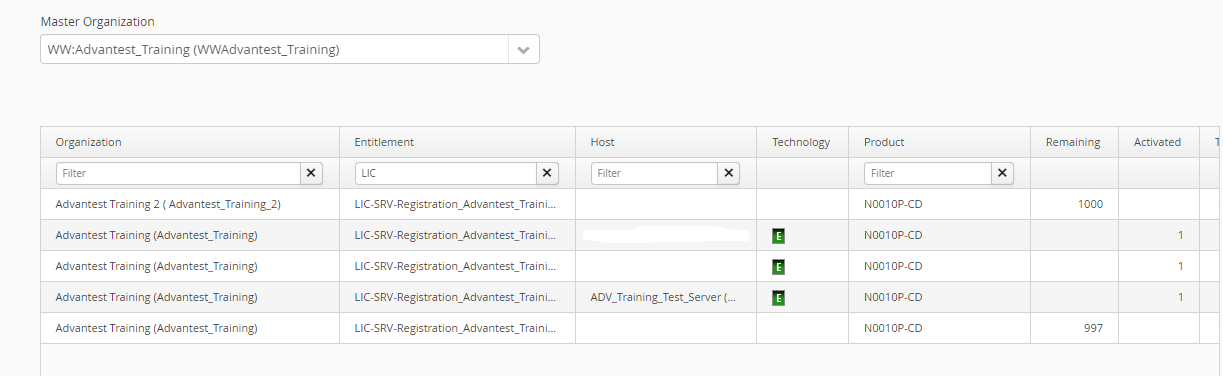
Please go to **License Portal → License management → Overview → Select master organization → Input keyword "LIC-SRV-Registration" in Entitlement filter → Find the lines in the "remaining" column that are not blank.**
**Example**: Under master organization *Advantest\_Training* sub-organizations *Advantest Training 2* and *Advantest Training* have available keys for registration.
[](https://lhc.advantest.com/uploads/images/gallery/2025-10/scaled-1680-/7-png.png)
# How to find which sub-organization a license server is registered under?
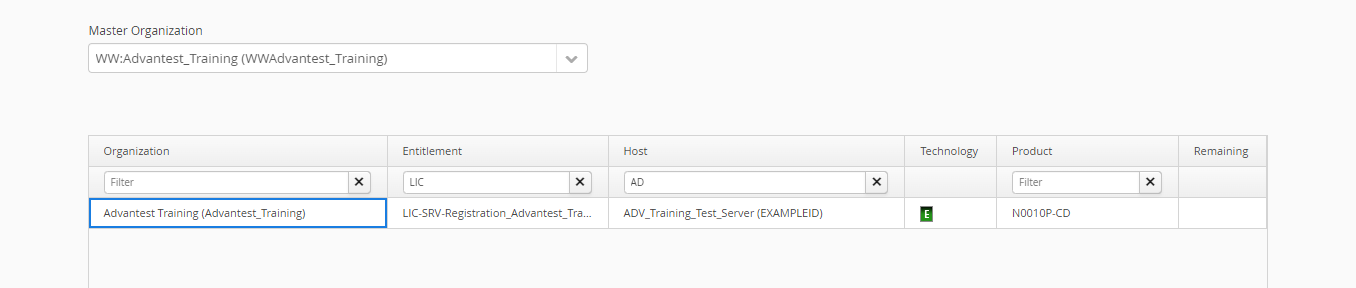
Please go to **License Portal → License management → Overview → Select master organization → Input keyword "LIC-SRV-Registration" in Entitlement filter → Input server name or server host id as the keyword in Host filter**
Example: Server *ADV\_Training\_Test\_Server(EXAMPLEID)* is registered under organization *Advantest Training*
[](https://lhc.advantest.com/uploads/images/gallery/2025-10/scaled-1680-/8b98-png.png)
# What is the process for customers after replacing the motherboard?
1. Reset the database with following command
```
cd /opt/flexnetls/socbu
sudo ./reset-fne-server -a
sudo systemctl start advantest-fne-server
```
2. Download the overview Excel via License Portal
3. Create a ticket and request the removal of the previous server's registration.
- **The customer cannot perform self-rehosting after the motherboard is damaged** and requires GLPT support to remove the registration and return the licenses to entitlement.
4. Proceed server registration after receiving removal confirmation from GLPT, then activate licenses according to overview.
# Can Advantest's license software be installed together with other companies' license software?
Advantest's license software can theoretically be installed on the same OS as other companies' license software.
However, we **will not** support any issues arising from these installations.
# Does FNE for Windows support FNP proxy?
**No.**
FNE on Windows only support FNE, FNP proxy is not supported. Please do not use FNE for Windows if you have any FNP clients.
# Is the FNX Server Installation possible with other FlexNet software running in parallel?
Parallel installation with other companies' license software **would be possible.** However, we **won't support any issues under this situation**.
# FNE / FNX troubleshooting
# Where are the log files?
You can find the **log files** in the following folders for
- **FNE server:** `/var/opt/flexnetls/socbu/logs > filename flexnetls*.log*` and `flexnetls.critical.log`
- **FNE server viewer:** `/var/opt/flexnetls/viewer/logs > filename fne-viewer.log* `
- **Proxy:** `/opt/flexlm/log > filename proxy_socbu*.log`
# How to update FNX/FNE license servers' software?
See also - [Failover license server installation, upgrades and updates](https://lhc.advantest.com/books/flexnet-embedded-licensing/page/failover-license-server-installation-upgrades-and-updates).
It is the advantage of the FNE/FNX server, that an update works without downtime. Do the following steps:
**Note**: If there is not a failover or tertiary server existing, you can skip the steps accordingly.
1. **Test the integrity** of the downloaded SW on the primary license server:
`sh install-fne--.sh test`
If you get the message "Package integrity verified" you can proceed with the other steps.
2. Get emergency license for standby emergency license server and install it - just to be prepared
3. **Primary server**: Do a dry-run installation on the primary server and look for messages. Example for the dry-run command:
`sudo sh install-fne--.sh dry-run`
4. **Primary server**: If there are not any problems reported with the dry-run, do the update on the primary server. Example for the update command (no option used):
`sudo sh install-fne--.sh`
5. Check e.g. with `fne-status`, that the primary server is running.
6. Wait 2 minutes.
7. **Failover server**: Do the update also on the failover server. See command above.
8. Check e.g. with `fne-status`, that the failover server is running.
9. Wait 2 minutes.
10. Check with `fne-status`, if the FNE failover and (if installed) FNP triad is up again.
11. **Tertiary server**: Do the update also on the tertiary server.
12. Check e.g. with `fne-status`, that all servers are running.
If there are any problems, please check, if a switch to the standby emergency license server is reasonable and open a LIST ticket to report the problem.
# FNE registration problems
Error "Connection to https://license.advantest.com/flexnet/deviceservices failed with exception"
##### **Issue description**:
The user tried command
`register-fne-server `
with the appropriate <id> and got the following error message:
> Failed to activate your server
> \\{
> "key" : "glsErr.connectionFailed",
> "message": "Connection to https://license.advantest.com/flexnet/deviceservices failed with exception: exception: error on POST request for \\ \\"[https://license.advantest.com/fL](https://license.advantest.com/fL)
> exnet/deviceservices\\": Connection reset; nested exception is javax.net.ssl.SSLException: Connection reset,\*
> : \[ "https://license.advantest.com/flexnet/deviceservices, I/0 error on POST request for \\"https://license.advantest.com/flexnet/deviceservices\\": Connec
> tion reset; nested exception is javax.net.ssl.SSLException: Connection reset \]\*
##### **Background information**:
The connection to license.advantest.com with port 443 was not really available, but for the FNE server software it looked like that a connection is possible, therefor it tried and failed.
**Solution**: Enter the line
**`0.0.0.0 license.advantest.com`**
to file **`/etc/hosts.`**
# FNE log file: errors and messages
Installation problems - error "/tmp/: failed to map segment from shared object: Operation not permitted"
Creation date: 08-Jan-2020
Author: Heike Klein
**Issue description:** The FNE server has been installed but cannot be started.
Log file error in **`/var/opt/flexnetls/socbu/logs/flexnetls.log.`** - highlighted in red:
> 00:02:49,408 **advantest-fne-server start**
> 00:02:55,431 Used Options: /usr/lib/jvm/java-1.8.0-ibm-1.8.0.5.40-1jpp.1.el7.x86\_64/jre/bin/java -Dbase.dir=/var/opt/flexnetls/socbu -Djsse.enableSNIExtension=false -server -Xms2g -Xmx2g -XX:CompressedClassSpaceSize=64m -XX:MetaspaceSize=256m -XX:+UseG1GC -XX:NewRatio=3 -XX:MaxGCPauseMillis=75 -XX:G1HeapWastePercent=10 -XX:InitiatingHeapOccupancyPercent=75 -XX:+CMSScavengeBeforeRemark -XX:+IgnoreUnrecognizedVMOptions --add-opens=java.base/java.lang=ALL-UNNAMED --add-opens=java.base/java.lang.invoke=ALL-UNNAMED -XX:+ScavengeBeforeFullGC -Djava.security.egd=file:/dev/./urandom -jar /opt/flexnetls/socbu/flexnetls.jar -server-alias thbnk01fnxspl1v.th-bnk01.nxp.com -producer-settings /opt/flexnetls/socbu/producer-settings.xml -port 7070 -https-client-configuration /var/opt/flexnetls/socbu/outgoing-certs.conf
> 00:02:55,438 Environment: Version 2019.07.1.0-19315 / 7.6GB mem / 3.1GB disk free / 4x Intel(R) Xeon(R) CPU E5-2667 v3 @ 3.20GHz / Red Hat Enterprise Linux Server release 7.6 (Maipo)
> 00:02:58,835 INFO main Starting FlexNet License Server 2019.07 (build 256892)
> 00:02:58,836 INFO main Copyright (C) 2013-2019 Flexera Software LLC.
> 00:02:58,836 INFO main All Rights Reserved.
> 00:02:58,836 INFO main Running as a service
> 00:03:02,575 **ERROR main Native code loading error java.lang.UnsatisfiedLinkError: /tmp/llsnc-2019.07.1.0-256892-amd64-libconnector.so(/tmp/llsnc-2019.07.1.0-256892-amd64-libconnector.so:failed to map segment from shared object: Operation not permitted)**
> at java.lang.ClassLoader.loadLibraryWithPath(ClassLoader.java:1453)
> at java.lang.System.load(System.java:570)
**Reason for error:**
the servers tries to use/exceute a shared library located in the /tmp directory. This is not allowed on the appropriate system. Running executables from /tmp is forbidden by the noexec option in the mount flags: check the /etc/fstab entry which looks like
> /dev/mapper/vg00-tmp /tmp ext4 defaults,nodev,nosuid,noexec 1 2
**Solution:**
Ask IT to remove the `noexec` option to `/tmp` in `/etc/fstab `and remount it with
`mount -o remount,exec /tmp`
on all affected FNE license servers.
server filter checkout rejection
In the FNE log file flexnetls.log you maybe find the following message:
`server filter checkout rejection`
This message is basically saying the license requested is not available, f.e. for a specific serial number.
This is not an error of the server, its just the way the server returns a request for a license that is not present.
TS storage corrupted - FNE server cannot be started - FNE log error "FATAL main IO Exception: null"
In the FNE log file flexnetls.log you find the following entries:
03:36:16,826 INFO main Starting FlexNet License Server 2019.07 (build 256892)
03:36:16,827 INFO main Copyright (C) 2013-2019 Flexera Software LLC.
03:36:16,827 INFO main All Rights Reserved.
03:36:16,827 INFO main Running as a service
03:36:21,736 FATAL main IO Exception: null \[90028-196\]
Note: you can extract the log file errors with command: `showlog-fne-server -2`
The error indicates a corrupted TS storage. In order to repair it, do the following:
1. `cd /opt/flexnetls/socbu`
2. `sudo ./reset-fne-server -force`
3. **If there is a failover license server configured** you need to run the following command **(not as root!)** on the primary license server**` ./fne-failover-setup repair primary `**
This will repair the primary license server without touching the secondary license server.
Note: the repair option is available since June 2020. It is not available if an older FNE/FNX installation script has been used and the SW has not been updated since then. Please check with fne-failover-setup -help if the option is available.
4. **If the failover server is corrupt**, then you need to run the following command **(not as root!)** on the primary license server (this is not a typo - **you need to run it on the primary license server!**): `fne-failover-setup repair failover `
Note: The command `fne-failover-setup uses ssh/scp` and `sudo`. You may be asked for your password several times.
Note: you can check the help page of `fne-failover-setup `with: `fne-failover-setup -help`
# What is /var/opt/flexnetls/socbu/flexnetls_licenses.mv.db and can it be deleted?
**/var/opt/flexnetls/socbu/flexnetls\_licenses.mv.db** is the database of the FNE server and should not be deleted at all.
# What is directory /var/opt/flexnetls/socbu/logs/ used for and can it be deleted?
**/var/opt/flexnetls/socbu/logs/** contain the **log files** of the FNE server and is needed for analysis if something is going wrong. The logs directory is always around 12GB big: it is cleaned up to 10GB each day and on head is the up-to-date log file.
# License Portal Information
Subtopics:
- [How to change the FNE server hostname in the license portal?](https://lhc.advantest.com/link/40#bkmrk-how-to-change-the-fn-1)
- [How to do FNE renewal in March?](https://lhc.advantest.com/link/40#bkmrk-how-to-do-fne-renewa)
- [Is the rehosting of FNE licenses from one FNE license server to another FNE license server free of charge?](https://lhc.advantest.com/link/40#bkmrk-is-the-rehosting-of-)
[General Licensing Portal Process Information](https://lhc.advantest.com/books/license-portal-ptG)
# License Portal Information
##### Subtopics:
- [How to change the FNE server hostname in the license portal?](https://lhc.advantest.com/link/40#bkmrk-how-to-change-the-fn-1)
- [How to do FNE renewal in March?](https://lhc.advantest.com/link/40#bkmrk-how-to-do-fne-renewa)
- [Is the rehosting of FNE licenses from one FNE license server to another FNE license server free of charge?](https://lhc.advantest.com/link/40#bkmrk-is-the-rehosting-of-)
## How to change the FNE server hostname in the license portal?
When you register, the registration process will also transfer the hostname of the FNE (primary) license server to the Advantest Licensing Back-office (FNO). If you change the hostname on the FNE server after the registration, for example from localhost.localdomain to a real hostname, then the license portal will still show the localhost.localdomain entry. In order to get the hostname updated, please
- Run command
**`hostname -f`**
on the **FNE (primary) license server**. This will provide you the fully qualified hostname defined for this FNE server.
- Open a LIST ticket in WeTrack and provide the following data:
Request to change the FNE server hostname
Current FNE server hostname:
FNE server host ID:
New FNE server hostname (result from hostname -f):
## Do FNE need renewal in March?
With FNP you have to renew the perpetual licenses each year with the renewal portal.
- ***For online FNE license server:*** no action is needed. FNE licenses are permanent with expiration 31/Mar/2999. Changes with license server with the **automatic synchronization** each 12 hours.
- ***For offline FNE license server:*** FNE licenses are permanent with expiration 31/Mar/2999. Download the bin file from the license portal > tab "License Management" > via link "Download" and upload it via the FNE server viewer.
## Is the rehosting of FNE licenses from one FNE license server to another FNE license server free of charge?
Customers have a service level agreement with Advantest can do the rehosting of FNE licenses from one FNE license server to another FNE license server in the license portal. This is not charged and you do not have to fill out the rehosting form.
This self-service is one of the great benefits  of FNE.
If you need to migrate FNP licenses to an FNE license server, you should contact with your Advantest representatives for the migration request, with starting a discussion about timeframe, licenses to be migrated (you need to fill out a migration form), prerequisites and other open questions.
We do not provide a rehosting of migrated FNE licenses back to an FNP license server.
# Tools Information
Subtopics:
- [How to use test\_license\_chechout tool](https://lhc.advantest.com/books/fne-and-fnx/page/how-to-use-test-license-checkout-tool)
- [Available FNE commands](https://lhc.advantest.com/books/fne-and-fnx/page/terminal-commands-questions)
- [What is the difference between # connected clients and # connected tester clients in the FNE server viewer?](https://lhc.advantest.com/link/42#bkmrk-what-is-the-differen)
- [How to receive license expiration notification via email?](https://lhc.advantest.com/link/43#bkmrk-page-title)
# How to use test_license_checkout tool
##### **Prerequisite to run the tool on an FNE server:**
FNE client SW (`v93000-fne-client-` must be installed. You can run the tool without providing the path to the tool (available in the PATH variable and can be found for RHEL7 in `/usr/bin `as link and existing in `/usr/local/bin` and for RHEL9 in `/usr/bin`).
### Which test\_license\_checkout parameters exist?
There are more parameters available. Please check with option -h the available parameters. Here only some parameters are listed.
`-h` : help
`-f ` : You have to provide the feature name of the license which shall be checked out. You have to take the feature name exactly as provided in the license file.
`-t