Note: if you have an **FNE failover setup**, you need to check this both for the **FNE primary and the FNE failover** servers.
2. [Are licenses provided?](https://lhc.advantest.com/link/20#bkmrk-2.-are-licenses-prov)Note: Using both tools provided in the sections "1. Is the FNE server running" and "2. Are licenses provided?" below, your customer can use a monitoring tool to check, if the FNE license server(s) are okay and providing licenses.
3. [For failover setup: when is the maintenance end reached?](https://lhc.advantest.com/link/20#bkmrk-3.-for-failover-setu) This is an **optional check**, for the case you want to know when the maintenance end is reached by the failover, when the primary server is down. --- ### 1. Is the FNE server running? If you want to check, if the FNE server is running, you can use the :7070/ping REST API. In a browser enter ``` http://For a **failover setup** you have to do this for the **primary and** the **failover** FNE server!
Output in the browser, if the server is running: [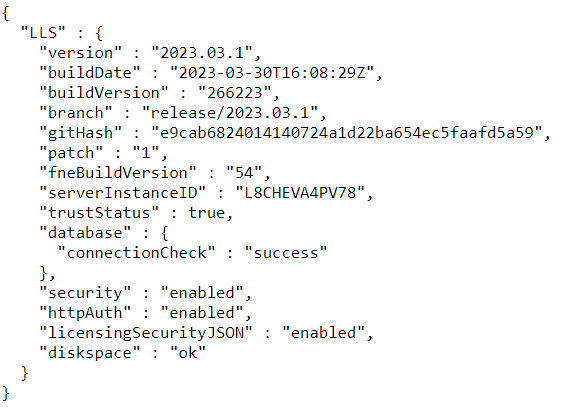](https://lhc.advantest.com/uploads/images/gallery/2025-10/scaled-1680-/new1-png.png) If it is not working, then you get an error page. ### 2. Are licenses provided?Note: the tool `test_license_checkout `can be used **after** FNE server registration.
In order to check, if the license checkout is working, you should use the tool `test_license_checkout`, which is also available on the FNE license server. Just checkout the dummy license with ``` test_license_checkout -f dummy -t 0 ``` Example for a successful checkout: [](https://lhc.advantest.com/uploads/images/gallery/2025-10/scaled-1680-/new2-png.png) Check for the "OK 1 x dummy" line. If it is available, the checkout was successful. ### 3. For failover setup: when is the maintenance end reached With the following command executed on the failover server you can get the date/time when the maintenance of the failover ends. ``` /opt/flexnetls/socbu/fne-get-config -1 maintenanceEndTime