# General License Questions
1\. Content
- What is an entitlement certificate?
- What is the expiration date of a license?
- What is a license?
- What is a license feature?
- What is a license product?
- Is a license server on a virtual machine (VM) supported?
2\. Contract licenses
- What is SSBXSUS\_VALUEPKG1 used for?
- What is the Tools package used for?
- How many Tools packages are on a contract?
- How many SSBXSUS-VALUEPGK1 are on a contract?
- What are the differences of SSBXS-TOOLPKG, SSBXS-TOOLPKG-PERSYS, SSBXSUS-VALUEPKG1 and SSBXS-VALUEPKG-NL?
- How many Tools packages are needed to run different applications?
3\. Operating System
- How to check if the system is synchronized?
- How to configure RHEL7 with **ntp**?
- How to configure RHEL9 with **chrony**?
4\. License Product
- What is SSBXC-SMT-REL-FNX-NL
- What is the difference between SSBXC-SMT-REL-FNX-NL and SSBXS-SMT-REL-FNX-NL
# Terminology
##### Subtopics
- [What is an entitlement certificate?](https://lhc.advantest.com/link/10#bkmrk-what-is-an-entitleme-1)
- [What is the expiration date of a license?](https://lhc.advantest.com/link/10#bkmrk-what-is-the-expirati)
- [What is a license?](https://lhc.advantest.com/link/10#bkmrk-what-is-a-license%3F)
- [What is a license feature?](https://lhc.advantest.com/link/10#bkmrk-what-is-a-license-fe)
- [What is a license product?](https://lhc.advantest.com/link/10#bkmrk-what-is-a-license-pr)
- [Is a license server on a virtual machine (VM) supported?](https://lhc.advantest.com/link/10#bkmrk-is-a-license-server-)
### What is an entitlement certificate?
- It is a document (HTML and/or paper copy) that is unique for each entitlement.
- It is the legal proof of ownership. It is very important to keep it.
- It is shipped together with the hardware product delivery as paper copy (if applicable), or sent by email for eDeliveries.
- It contains information about entitlement lines / license products, the quantity and the expiration date.
Example for an entitlement certificate:[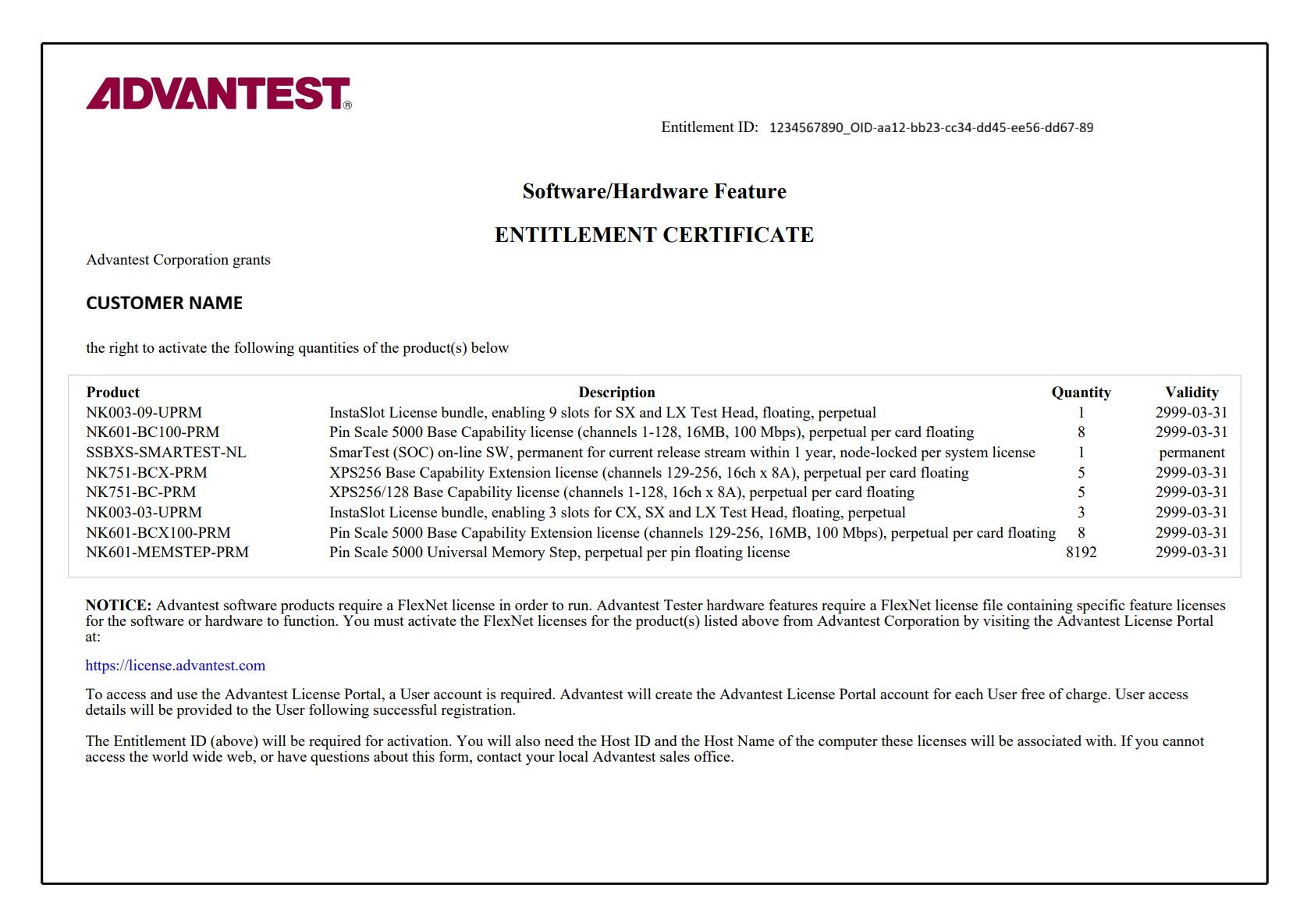](https://lhc.advantest.com/uploads/images/gallery/2025-11/entitlement-certificate.jpg)
In the example above
- The entitlement ID can be found in the upper right corner. This is an important key, needed for license activation. This key should not be shared to other companies.
- The CUSTOMER NAME is printed on the entitlement certificate, which is the owner of the entitlement certificate.
- There is a line for each license product visible in the box. Each line contains the Advantest license product name like "NK003-09-UPRM", the product description like "InstaSlot License bundle, enabling 9 slots for SX and LX Test Head, floating, perpetual", the number of license product available like 1 in the column Quantity and the validity, which means when the license will expire. The date 2999-03-31 stands for 31st March 2999 and is called "permanent" as this date is far in the future.
- The NOTICE shows that access to the license portal is needed in order to activate the licenses on the entitlement certificate to a license server, so that the license can enable the appropriate software or hardware feature(s).
### What is the expiration date of a license?
- It is the date after which the respective license will no longer be valid.
- If there is not an expiration date but the term “permanent”, then the license does not expire.
- Examples for expiration dates:
- *31-Mar-2026*
- *31-Mar-2999*
If the license has this expiration date, it is called “permanent” as the year 2999 is far in the future.
- At Midnight the license server checks the expiration dates and if a license expired, it is no longer available.
### What is a license?
A license allows the use of a specific hardware or software capability.
### What is a license feature?
- It describes a technical functionality enabled by a license (bin) file
- It consists of a name (= license string / string name) and a version number, e.g. Protocol\_Aware\_SOC, Version 1.0
- Every feature of a license product has a specific count, i.e. quantity that can be used simultaneously
### What is a license product?
- It consists of a product name (= product number), a description and a set of features and their quantities
- It describes an item that consists of a set of features.
**Example**:
License Product Name: N7050AOF
License Product Description: Pin Scale SmarTest off-line, permanent per session floating license
Feature: SmarTestOffline\_SOC Quantity: 1
In the example above it is only one feature with quantity 1. There could be a set of features with different quantities under the same license product.
### Is a license server on a virtual machine (VM) supported
The license server setup on a VM is supported. Support details:
- For a workstation based license server setup (“local” license server):
On an Advantest tester workstation with **supported** hypervisor/VM setup, the license server **must run** on the hypervisor for Z640 and Z4G4 workstation and on the VM for Z4G5 workstation.
- For a central license server setup (central license server, three-redundancy-license-server for FNP, failover system for FNE):
The customer server infrastructure can be based on any operating system providing the VM setup for the license server.
The used platform providing the VM is **not** supported by Advantest. The customer needs to take care.
The VM Operating System **must be** an Advantest supported Operating System for the license server software.
Advantest supports the license server software on this VM.
Cloning of licenses is **strictly forbidden** according to the Advantest terms of conditions.
# Contract licenses
##### Subtopics
- [What is SSBXSUS\_VALUEPKG1 used for?](https://lhc.advantest.com/link/11#bkmrk-what-is-ssbxsus_valu-1)
- [What is the Tools package used for?](https://lhc.advantest.com/link/11#bkmrk-what-is-the-tools-pa)
- [How many Tools packages are on a contract?](https://lhc.advantest.com/link/11#bkmrk-how-many%C2%A0tools-packa)
- [How many SSBXSUS-VALUEPGK1 are on a contract?](https://lhc.advantest.com/link/11#bkmrk-how-many-ssbxsus-val)
- [What are the differences of SSBXS-TOOLPKG, SSBXS-TOOLPKG-PERSYS, SSBXSUS-VALUEPKG1 and SSBXS-VALUEPKG-NL?](https://lhc.advantest.com/link/11#bkmrk-what-are-the-differe)
- [How many Tools packages are needed to run different applications?](https://lhc.advantest.com/link/11#bkmrk-how-many-tools-packa)
### What is SSBXSUS\_VALUEPKG1 used for?License product SSBXSUS\_VALUEPKG1 provides the license feature S&S\_Value\_Package\_SOC with version 1.0. It is not node-locked and only used for the cal converter for SmarTest 6.5.
### What is the **Tools package** used for?The license products for the Tools package are SSBXS-TOOLPKG or SSBXS-TOOLPKG-PERSYS.The Tools package license enables the following applications:
- ORE (offline result emulation)
- SmarTest Offline (SmarTest 8 only)
- TACO (Targetting and Correlation)
- TCCT (Testcell Control Tool)
- TP360 Basic
- VTC (virtual tester cell for EM360)
### How many **Tools packages** are on a contract?
License product SSBXS-TOOLPKG provides the license feature S&S\_Tools\_Package. It is a floating licenses. Normally there is also a S&S\_Tools\_Package available for each tester under the contract. For the testers still on warranty, which do not have an S&S\_Tools\_Package, the product SSBXS-TOOLPKG is provided with a quantity of 200 to cover the testers on warranty for a contract customer.
### How many SSBXSUS-VALUEPKG1 are on a contract?
There is only one SSBXSUS\_VALUEPKG1 on the contract. The appropriate feature S&S\_Value\_Package\_SOC has the quantity 200. So if you activate this the license product SSBXSUS\_VALUEPKG1, you will get 200 features S&S\_Value\_Package\_SOC on the selected licesne server. It is not possible to split up the 200 features on different license servers.
### What are the differences of SSBXS-TOOLPKG, SSBXS-TOOLPKG-PERSYS, SSBXSUS-VALUEPKG1 and SSBXS-VALUEPKG-NL?
SSBXSUS-VALUEPKG1 is for the calibration converter on SMT 6.5. It is not node-locked as the system serial number node-locking was introduced with SMT 7.
SSBXS-VALUEPKG-NL is for calibration converter for SMT 7 and higher and is node locked to the system serial number.
SSBXS-TOOLPKG-PERSYS is a license for each system in case you install the license on a local license server on each tester workstation and do not use a central server.
### How many Tools packages are needed to run different applications?
Here different scenarios are described.
#### **Online scenarios**
##### ***Scenario 1 - online scenario with SmarTest 7***
1. Start SmarTest 7 online: this will check out 1st Tools package license automatically
2. Start TCCT: this will check out 2nd Tools package license
3. The 2nd Tools package license will be returned within a minute by TCCT (after the minute, only one Tools package is checked out)
4. Start TP360: the 2nd Tools package license will be checked out again.
5. SMT online is shut down or TP360 is turned off, then the tools package licenses will be returned.Number of Tools package licenses needed: 2.
##### ***Scenario 2 - online scenario with SmarTest 7***
1. Start SmarTest 7 online: this will check out 1st Tools package license automatically
2. Start TCCT: if a Tools package license is not available, TCCT will look for the license feature Testcell\_GUI and check it out.
3. The license feature Testcell\_GUI will stay checked in as long as TCCT runs.
4. Start TP360: if a Tools package license is not available, TP360 will look for the license feature TP360\_Basic and check it out.
5. TCCT is turned off, the TCCT license feature Testcell\_GUI will be returned.
6. TP360 is turned off, the TP360 license feature TP360\_Basic will be returned.
7. SMT online is turned off, the Tools package license will be returned.Number of Tools package licenses needed: 1.Besides this also a TCCT and TP360 license is needed.
##### ***Scenario 3 - online scenario with SmarTest 7***
1. Start TCCT: this will check out the 1st Tools package license.
2. The 1st Tools package license will be returned within a minute by TCCT (after the minute, only one Tools package is checked out)
3. Start SmarTest 7 online: the 1st Tools package license will be checked out again.
4. Start TP360: the 2nd Tools package license will be checked out.
5. SMT online is shut down or TP360 is turned off, then the tools package licenses will be returned.Number of Tools package licenses needed: 2.
##### ***Scenario 4 - online scenario with SmarTest 7***
1. Start SmarTest 7 online: this will check out 1st Tools package license automatically
2. Start TP360: the 2nd Tools package license will be checked out.
3. Start TCCT: this will check out the 3rd Tools package license.Number of Tools package licenses needed: 3.
Note: TP360 normally is not used in online mode, especially not with TCCT.
##### ***Scenario 5 - online scenario with SmarTest 8***
1. Start SmarTest 8 online: the Tools package license will NOT be checked out.
2. Start TCCT: this will check out the 1st Tools package license.
3. The 1st Tools package license will be returned within a minute by TCCT.Number of Tools package licenses needed: 1.
#### **Offline scenarios**
Note: Normally TP360 is not used so frequently with SmarTest offline.
##### ***Scenario 6 - offline scenario with SmarTest 7***
1. Start SmarTest 7 offline: SmarTest 7 offline license is checked out and 1st Tools package license is checked out automatically
2. TCCT will not be started with SmarTest offline.
3. Start ORE: this will be enabled by the 1st tools package
4. Start TP360: the 2nd Tools package license will be checked out.
5. (Start TACO: Not sure whether it is running together with SMT7)Number of Tools package licenses needed: 2.
##### ***Scenario 7 - offline scenario with SmarTest 8***
1. Start SmarTest 8 offline: SmarTest 8 offline requires a SmarTest offline license **or** the Tools package license
2. TCCT will not be started with SmarTest offline.
3. Start ORE: no license needed in SmarTest 8 before SmarTest 8.7.3.
With SMT 8.7.3: ORE will be enabled if SMT8 offline is using the Tools Package license
4. Start TP360: the 2nd Tools package license will be checked out.
5. Start TACO: no license needed for SMT8Number of Tools package licenses needed: 2.
# Operating System
##### Subtopics
- [How to check if the system is synchronized?](https://lhc.advantest.com/link/13#bkmrk-how-to-check-if-the--1)
- [How to configure RHEL7 with **ntp**?](https://lhc.advantest.com/link/13#bkmrk-how-to-configure-rhe)
- [How to configure RHEL9 with **chrony**?](https://lhc.advantest.com/link/13#bkmrk-how-to-configure-rhe-1)
### How to check if the system is synchronized?
On RHEL7 the time synchronization is done via **ntp** and on RHEL9 via **chrony**. For license checkout either the license server(s) and the clients need to be synchronized timely.
Please check with
```
timedatectl
```
if the system is **synchronized**.
In the screenshot above the system is not configured for time synchronization and **ntp** is disabled.
### How to configure RHEL7 with ntp?
**Note**: In general customer IT is responsible to set up the time synchronization. The information below is just for your convenience, but is not part of GLPT support.
##### **Prerequisite:**
You need a reliable time server.
Steps to be checked:
1. Check if **ntp** is installed with
`rpm -q ntp`
If it is not installed, you can try to get it with
`sudo yum install ntp`
2. open` /etc/ntp.conf` with an editor (you need editing permissions or `sudo` rights)
Here you can add the NTP server with adding the line
server hostname `iburst`
**Example**:
`server time.google.com iburst`
3. Check if **ntp** service is enabled / started with
`systemctl status ntpd`
***If it is not started / enabled***
1. Enable **ntp** service for being started with a reboot:
`sudo systemctl enable ntpd`
2. Start **ntp** service with
`sudo systemctl start ntpd`
4. Check the time synchronization:
`sudo ntpq -p`
The **ntpq** command queries the **ntp** servers defined and you get with **option -p** a table back with statistics.
5. Check with `timedatectl`, if **ntp** is enabled and synchronized.
***If ntp is still not enabled***, use:
`sudo timedatectl set-ntp true`
`sudo systemctl start ntpd`
Wait a minute and check with `timedatectl` again.
#### **Addition from user experience**
From user experience: even with configuring, enabling and starting the **ntp** daemon the synchronization status was still no (because the time servers configured had an offset). Using
```
sudo systemctl stop ntpd
sudo ntpd -gq
sudo systemctl start ntpd
```
helped here. The options are for (see also [https://www.tekopolis.com/sync-ntp-immediately-linux/](https://www.tekopolis.com/sync-ntp-immediately-linux/))
1. **option -q**: overrides the built in sanity check of 1000s. If the system time is over 1000s off from the configured server time, the ntpd process would quit otherwise.
2. **option -q**: for quitting the daemon after the clock has been set
### How to configure RHEL9 with chrony?
**Note**: In general customer IT is responsible to set up the time synchronization. The information below is just for your convenience, but is not part of GLPT support.
##### **Prerequisite:**
You need a reliable time server.
Steps to be checked:
1. Check if `chrony` is installed with
`rpm -q chrony`
***If it is not installed***, you can try to install it with
`sudo yum install chrony`
2. open `/etc/chrony.conf` with an editor (you need editing permissions or sudo rights)
Here you can add the time server with adding the line
`server hostname iburst`
**Example:**
`server time.google.com iburst`
3. Check if `chrony` service is enabled / started with
`systemctl status chronyd`
***If it is not started / enabled***
1. Enable `chrony` service for being started with a reboot:
`sudo systemctl enable chronyd`
2. Start `chronyd` service with
`sudo systemctl start chronyd`
4. Check with `timedatectl`, if `chrony `is enabled and synchronized.
# License Product
##### Subtopics
- [What is SSBXC-SMT-REL-FNX-NL](https://lhc.advantest.com/link/14#bkmrk-what-is%C2%A0ssbxc-smt-re)
- [What is the difference between SSBXC-SMT-REL-NL and SSBXS-SMT-REL-NL](https://lhc.advantest.com/link/14#bkmrk-what-is-the-differen)
### What is SSBXC-SMT-REL-FNX-NL
SSBXC-SMT-REL-FNX-NL belongs to SSBXC-SMT-REL-NL (SmarTest one-time upgrade license). SSBXC-SMT-REL-FNX-NL is not visible on the activation or rehosting page of the license portal, but it is visible on the entitlement overview page and if activated to an FNE server, the appropriate SmarTest\_SOC license with vendor string %%SERIALNUMBER:<SN> , PROXY:FNP%% is visible in the FNE server viewer.
If you activate SSBXC-SMT-REL-NL
- **to an FNP license server**, then this product is not needed. You can ignore it.
- **to an FNE license server**, then SSBXC-SMT-REL-FNX-NL will be also activated to the same FNE server with the same system serial number, the same date version and the information proxy. This license enables the proxy to checkout the SmarTest one-time upgrade license correctly.
For the SmarTest license product like SSBXS-SMARTEST-NL such a hidden associated license for the proxy is not needed.
### What is the difference between SSBX**C**-SMT-REL-NL and SSBX**S**-SMT-REL-NL
The license products SSBXC-SMT-REL-NL and SSBXS-SMT-REL-NL are SmarTest one-time update products, which allow the use of exactly one specific 3-digit SmarTest release, e.g. 8.5.4.
The difference between the two license products:
- SSBX**C**-SMT-REL-NL: the "**C**" stands for "configured item", which means it can be ordered either in a bundle with a tester purchase, or as a standalone order.
- SSBX**S**-SMT-REL-NL: the "**S**" stands for "service contract". However, customers with a service contract get the SmarTest SW updates as part of the contract anyway, so this item here is only used in special cases, e.g. low-cost contracts, which is a rather rare use case.