# Terminology
##### Subtopics
- [What is an entitlement certificate?](https://lhc.advantest.com/link/10#bkmrk-what-is-an-entitleme-1)
- [What is the expiration date of a license?](https://lhc.advantest.com/link/10#bkmrk-what-is-the-expirati)
- [What is a license?](https://lhc.advantest.com/link/10#bkmrk-what-is-a-license%3F)
- [What is a license feature?](https://lhc.advantest.com/link/10#bkmrk-what-is-a-license-fe)
- [What is a license product?](https://lhc.advantest.com/link/10#bkmrk-what-is-a-license-pr)
- [Is a license server on a virtual machine (VM) supported?](https://lhc.advantest.com/link/10#bkmrk-is-a-license-server-)
### What is an entitlement certificate?
- It is a document (HTML and/or paper copy) that is unique for each entitlement.
- It is the legal proof of ownership. It is very important to keep it.
- It is shipped together with the hardware product delivery as paper copy (if applicable), or sent by email for eDeliveries.
- It contains information about entitlement lines / license products, the quantity and the expiration date.
Example for an entitlement certificate:[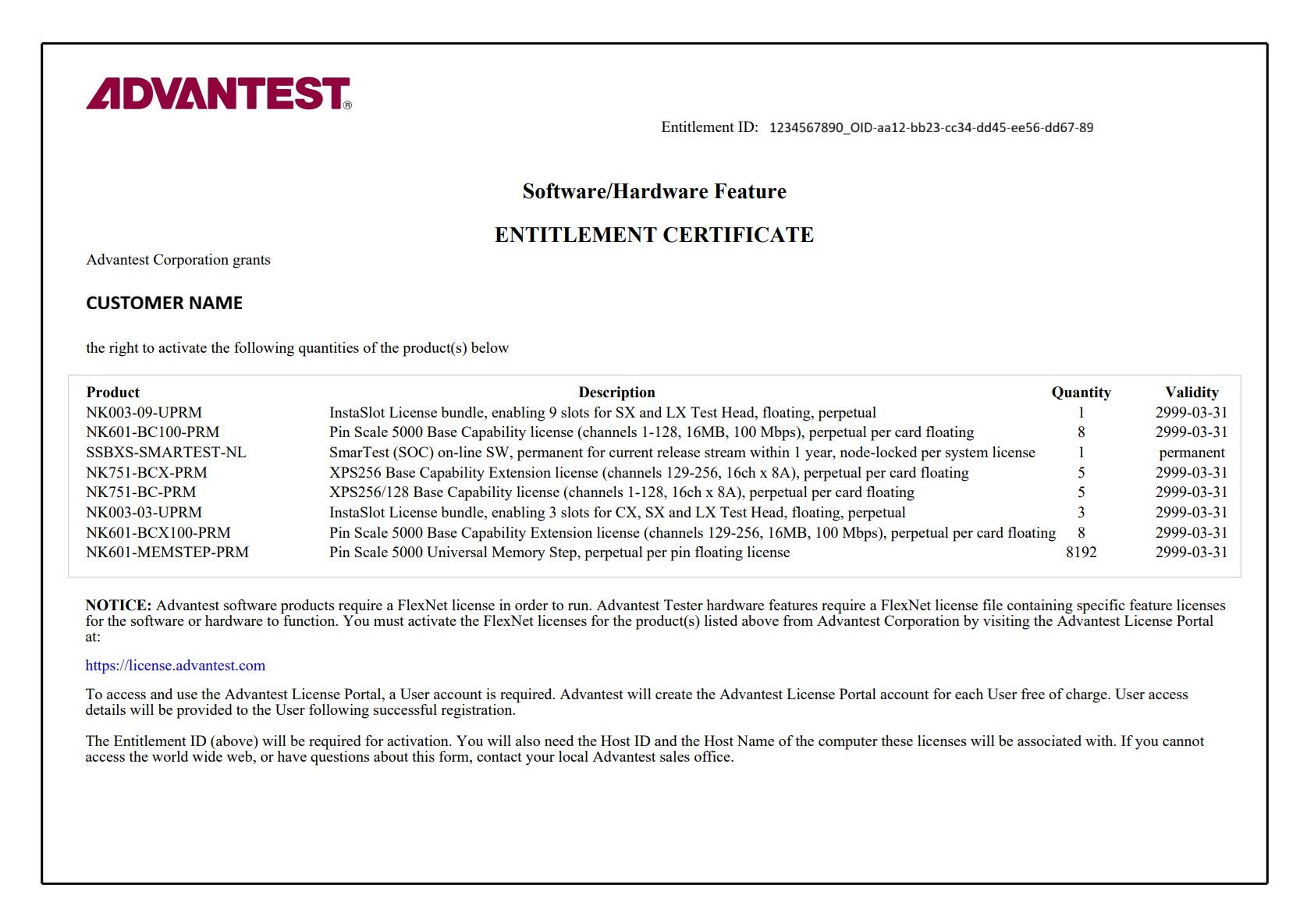](https://lhc.advantest.com/uploads/images/gallery/2025-11/entitlement-certificate.jpg)
In the example above
- The entitlement ID can be found in the upper right corner. This is an important key, needed for license activation. This key should not be shared to other companies.
- The CUSTOMER NAME is printed on the entitlement certificate, which is the owner of the entitlement certificate.
- There is a line for each license product visible in the box. Each line contains the Advantest license product name like "NK003-09-UPRM", the product description like "InstaSlot License bundle, enabling 9 slots for SX and LX Test Head, floating, perpetual", the number of license product available like 1 in the column Quantity and the validity, which means when the license will expire. The date 2999-03-31 stands for 31st March 2999 and is called "permanent" as this date is far in the future.
- The NOTICE shows that access to the license portal is needed in order to activate the licenses on the entitlement certificate to a license server, so that the license can enable the appropriate software or hardware feature(s).
### What is the expiration date of a license?
- It is the date after which the respective license will no longer be valid.
- If there is not an expiration date but the term “permanent”, then the license does not expire.
- Examples for expiration dates:
- *31-Mar-2026*
- *31-Mar-2999*
If the license has this expiration date, it is called “permanent” as the year 2999 is far in the future.
- At Midnight the license server checks the expiration dates and if a license expired, it is no longer available.
### What is a license?
A license allows the use of a specific hardware or software capability.
### What is a license feature?
- It describes a technical functionality enabled by a license (bin) file
- It consists of a name (= license string / string name) and a version number, e.g. Protocol\_Aware\_SOC, Version 1.0
- Every feature of a license product has a specific count, i.e. quantity that can be used simultaneously
### What is a license product?
- It consists of a product name (= product number), a description and a set of features and their quantities
- It describes an item that consists of a set of features.
**Example**:
License Product Name: N7050AOF
License Product Description: Pin Scale SmarTest off-line, permanent per session floating license
Feature: SmarTestOffline\_SOC Quantity: 1
In the example above it is only one feature with quantity 1. There could be a set of features with different quantities under the same license product.
### Is a license server on a virtual machine (VM) supported
The license server setup on a VM is supported. Support details:
- For a workstation based license server setup (“local” license server):
On an Advantest tester workstation with **supported** hypervisor/VM setup, the license server **must run** on the hypervisor for Z640 and Z4G4 workstation and on the VM for Z4G5 workstation.
- For a central license server setup (central license server, three-redundancy-license-server for FNP, failover system for FNE):
The customer server infrastructure can be based on any operating system providing the VM setup for the license server.
The used platform providing the VM is **not** supported by Advantest. The customer needs to take care.
The VM Operating System **must be** an Advantest supported Operating System for the license server software.
Advantest supports the license server software on this VM.
Cloning of licenses is **strictly forbidden** according to the Advantest terms of conditions.