# Remove a bridging license
# How can I remove a bridging license for FNP and FNE
***Use case description***:
If a bridging license is **expiring** and if there is **no successor bridging** license SMT 7 *will crash*.
In most cases the correct licenses have been activated towards the server, but they will not be used automatically by SMT upon expiring bridging license.
SMT will need a restart before they use the normal licenses, and this is only possible if either the bridging license has expired (SMT crashed already) or the bridging license has been removed.
# Removing bridging license from FNE license server
This can be done via **License Portal:**
1. Log in to the license portal and click on the “License Management” tab.
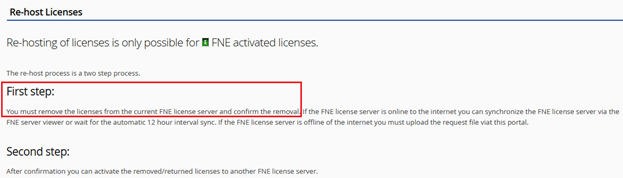
2. Then select **Re-host Licenses,** the first step of rehosting is always removing the licenses from the server first. Which will be used to remove the bridging license, and the second step will not be executed.
[](https://lhc.advantest.com/uploads/images/gallery/2025-10/scaled-1680-/6-png.png)
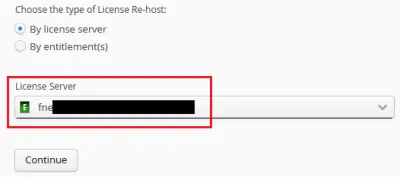
3. Select the **FNE server** on which the bridging license is activated:
[](https://lhc.advantest.com/uploads/images/gallery/2025-10/scaled-1680-/7-webp.webp)
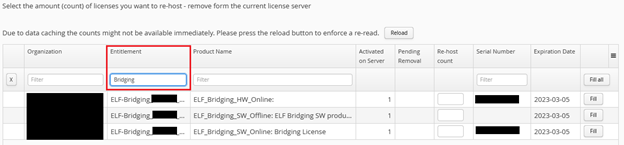
4. Continue to the **license selection part** and search for “**Bridging**” in the filter segment under “**Entitlement**”:
[](https://lhc.advantest.com/uploads/images/gallery/2025-10/scaled-1680-/8-png.png)
5. **Select** the licenses and fill in the amount that will be removed.
6. Continue with the selection and remove the bridging license. The appropriate FNE server needs to be synchronized, if it is online or for the case it is offline, you need to download the bin file and upload it via the FNE server viewer of the appropriate FNE server. This will remove the bridging license from the FNE server.
***Remember this is the rehost process***, but we´re only completing step one, which is to remove the bridging license.
**Smartest must be restarted afterwards to ensure its working with the correct licenses.**
# Removing bridging license from FNP license server
Here you do not need the license portal, but need to do the action on the FNP license server.
For removing the bridging license file from the license server under the /opt/flexlm/license directory:
```
cd /opt/flexlm/license
rm
```
**Note**: if it is a local license server, the licenses might be under directory **`/opt/flexlm/local_license`**.
For re-reading the licenses on the license server execute:
```
Rhel5 /opt/flexlm/bin/lmutil lmreread –c /opt/flexlm/license
Rhel7 sudo –u lmadmin /opt/flexlm/bin/lmutil lmreread –c /opt/flexlm/license
```
**After re-reading** the licenses **Smartest can be restarted** to receive the correct licenses.