# FNP License Renewal portal

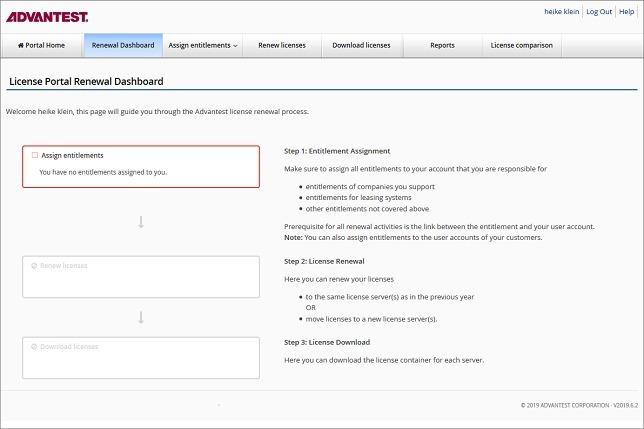
The Advantest Renewal Portal page provides you an overview of the high-level tasks that you must complete to renew your FNP licenses.

To access the Advantest License portal, sign on under: [https://license.advantest.com/](https://license.advantest.com/).

There are three main steps:

<div id="bkmrk-assigning-entitlemen">- **Assigning entitlements to your account** so that you can renew the associated FNP licenses
- **Renewing** the FNP **licenses** for which you are responsible
- **Download** the renewed FNP licenses

</div>The License Renewal Dashboard flow chart includes shortcut links to these main pages. [![5.jpg](https://lhc.advantest.com/uploads/images/gallery/2025-10/scaled-1680-/5-jpg.jpeg)](https://lhc.advantest.com/uploads/images/gallery/2025-10/scaled-1680-/5-jpg.jpeg)
For detailed information on assigning entitlements, renewing licenses, and downloading renewed licenses, see [FNP License Renewal](https://lhc.advantest.com/books/fnp-license-renewal "Advantest licenses are purchased on a perpetual basis. However, you must physically renew your FlexNet (FNP) license keys on an annual basis using the web-based Advantest License Renewal Portal. All FNP perpetual licenses expire on 31st March the following year.").

<nav id="bkmrk-related-information-" role="navigation">## Related information

<div class="ri">- [Entitlements](https://lhc.advantest.com/books/fnp-license-renewal/page/entitlements "While your company can hold several entitlements, acquired with different purchases, only a subset of those entitlements may be assigned to your user account. To see your assigned entitlements, sign in to your user account at the Advantest Renewal Portal and click the Assign Entitlements link.")
- [Renewing your licenses](https://lhc.advantest.com/books/fnp-license-renewal/page/renewing-your-licenses "Renewing your licenses enables to keep using them.")
- [Downloading licenses](https://lhc.advantest.com/books/fnp-license-renewal/page/downloading-licenses "You must download the licenses that you have renewed and install them on your license server.")
- [Viewing license information and reporting](https://lhc.advantest.com/books/fnp-license-renewal/page/viewing-license-information-and-reporting "The Overview and Reports page helps you to get an overview about the status of your product licenses and entitlements that are assigned to your user account. The following preconfigured reports are included:")
- [Managing entitlement and license server aliases](https://lhc.advantest.com/books/fnp-license-renewal/page/managing-entitlement-and-license-server-aliases "Entitlements and servers can be assigned aliases (alternative, easily-recognizable names).")
- [Downloading the data for license comparison](https://lhc.advantest.com/books/fnp-license-renewal/page/downloading-the-data-for-license-comparison "The License Renewal Comparison Tool supports you in the annual license renewal process by providing you with two summary CSV files (Renewed.csv and To-Be-Renewed.csv) that list the already renewed licenses and the still-to-be-renewed licenses. The two files helps you maintain and overview of the current status of the Advantest License Renewal Portal's records.")

</div></nav>