Licensing Reference
V93000 license products
Table of content
The V93000 license products master lookup table details all available V93000 license products.
Introduction
Licenses for both hardware and software features as well as licenses available/enabled with support contracts are contained in the V93000 License Master Look-up Table.
The following details are included:
- License features, versions and feature counts per product.
- Available license models per product (30 day, 6 month, 1 year, annual subscription, perpetual, node-locked, floating, ...).
- Indicator highlighting whether license product is supported by SmarTest 8.
- License feature definition information required in model file or device license file (DLF, SmarTest versions 5, 6, and 7) and test program licensing file (TPLF, SmarTest 8).
- SmarTest version from which the feature was enabled with the associated license.
Note: N/A in the License enabling start column identifies licenses that are not part of SmarTest, for example, licenses for standalone software tools.
- SmarTest revision from which the feature or the license was disabled For example, a licensed feature was included as standard functionality or included in the hardware base capability.
Note: N/A in the License disabling column indicates that the license is still active. The license has not been obsoleted or the associated functionality has not become hardware or system base capability.
- Comments to help explain changes, such as license application, changes, obsolescence, ...).
Using the filters
The filter functionality of the master lookup table can be used to display subsets of the available licenses, making the data more manageable for viewing. Use the filtering options for a specific license data type to limit the information returned. Only data that matches the criteria is displayed in the list.
The filter types are applied as follows:
- Select an option from a dropdown list.
- Enter a string (case independent). All instances of the data type associated with the filter containing the string are displayed.
Multiple filters can be set in conjunction to further refine the data displayed.
Note: The columns License enabling start and License disabling show the SmarTest versions that support the associated license product or the license feature.
Example
Filtering with strings and menu options
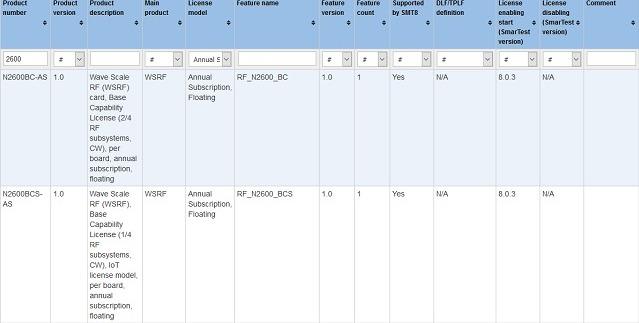
The following screenshot shows the results for all licenses containing the string 2600 in the product number and having a License model type: Annual Subscription, Floating.
Downloading licenses
If the FNE license server is not connected to the internet you must manually download the license container from the Advantest License Portal and upload it to the FNE license server.
About this task
If the FNE license server does not have access to the Internet, you must manually download the license container file from the Advantest License Portal and upload it to the FNE license server.
You need to use the download/email function in the License Portal to get the license container. The license container is delivered in a zip file which you must unzip to get the actual license container "bin" file.
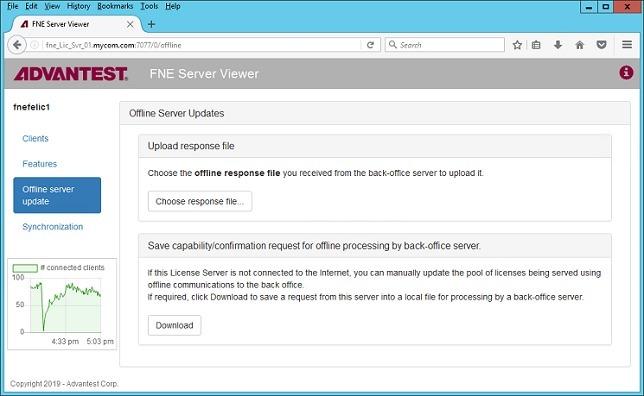
The license container "bin" file can be uploaded to the FNE license server via the FNE Server Viewer's Offline Server Update function.
Before you begin
For activating licenses on FNE license servers that do not have access to the Internet, you need an additional computer with access to the Internet.
You need to have a login to the Advantest License Portal. If you are not able to login, get in contact with your Advantest representative.
Activate your licenses as described in Activating licenses or Activating licenses advanced.
Procedure
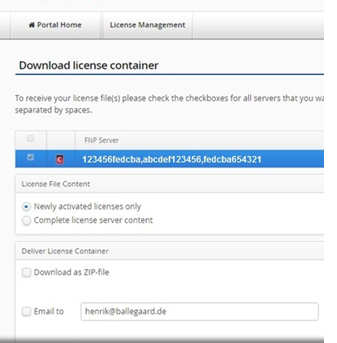
- Click Download license to download the license file.
The list of license servers are displayed.
Select the license servers you want to download.

You can either download the zip file or you can receive it by email.
- On your license server workstation, start the FNE Server Viewer by entering the following URL in a web browser:
http://<server_name>:7077
Results
The licenses are generated and uploaded it to the FNE license server.
Mixed FlexNet Embedded and FlexNet Publisher licensing
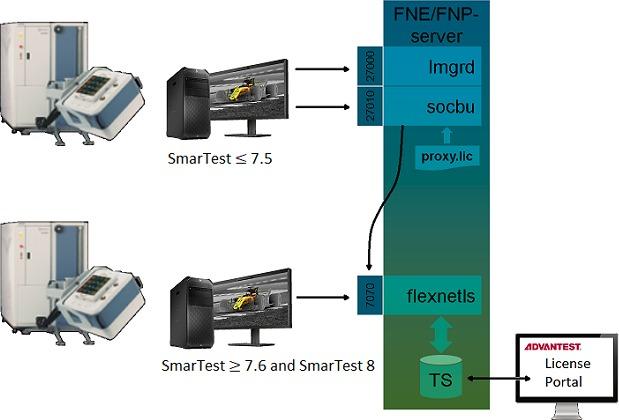
FlexNet Embedded (FNE) and FlexNet Publisher (FNP) license management can be handled from an FNE license server installation, using the FNP to FNE proxy solution, simplifying license management.
Benefits of integrated mixed licensing includes:
- Simpler licensing management.
- License re-hosting for SmarTest 5, 6, 7 and 8.
- Automatic annual renewal of perpetual licenses.
The license server software is installed using the tool: install-fne-date-version.sh
| Package | Option | Description |
|---|---|---|
| FNX-Server | fnx | Installs the FNE server and the FNP2FNE Proxy for managing mixed license environments |
| FNE-Server (Native) | server |
Installs the FNE Server and Viewer. The FNE Server Viewer is used to monitoring license servers. In addition, it can be used for:
|
| FNP2FNE-Proxy | proxy | Installs the standalone package for the FNP2FNE Proxy and license client (excludes the FNE-server). |
| FNP2FNE proxy only | tertiary | Installs the FNP2FNE proxy only.
Used on the tertiary (FNP) server of a mixed license failover installation. |
| Test License checkout tool | tlc | Installs the test_license_checkout tool. |
| FNE-Client | client | Installs the FNE client package (including the test_license_checkout tool). |
| Reinstall | reinstall | Reinstalls the server package.
Use this option to repair a failed or damaged installation. |
| README | readme | Shows the readme file and exits. |
| Test | test | Verifies the download file and reports the MD5 hash value. |
For information about licensing tools and utilities, see: