Installing the FNE license client
Installing a FlexNet Embedded license client used to provide the activated licenses to a SmarTest installation on a system controller workstation requires two steps: the installation of the license client software itself on the SmarTest host system, and configuration of the license server configuration file to prioritized the order of server access.
About this task
Installing the FNE license client (installed as default license client) also installs the FNE Server Viewer. For more details, see Monitoring license servers using the FNE Server Viewer.
The following procedure explains how to install the FlexNet client.
Before you begin
The license client is the SmarTest software. The FlexNet license server communicates with SmarTest using the FNE client.
The license client install package can be downloaded from the FNE section of the Advantest Software Center:
https://softwarecenter.advantest.com/download/othersw/builds/licensing
The following procedure is applicable to installation, upgrades and updates.
Note: During upgrading and updating, the installation script can be called without any option. All installed packages are detected automatically and updated if applicable.
sudo sh install-fne-date-version.sh
Port 7070 must be open to the customer FNE license server and if needed to the cloud license server.
To check connection to your license servers, use the command:
If you are using the Advantest cloud license servers, check the connections by opening the following URLs:
- http://<license-server>:7070/ping
- https://<Device Owner FNE license server>.advantest.cloud:7070/ping
- https://<Device Owner FNE license server>-fo.advantest.cloud:7070/ping
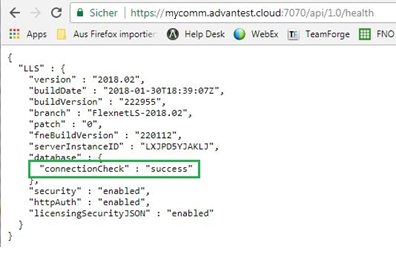
If port 7070 is open, the following type of output is displayed:

Procedure
- Open the Advantest Software Center in a browser: https://softwarecenter.advantest.com/
Login with your credentials.
- To get the list of all available Licensing products, from the left menu select:

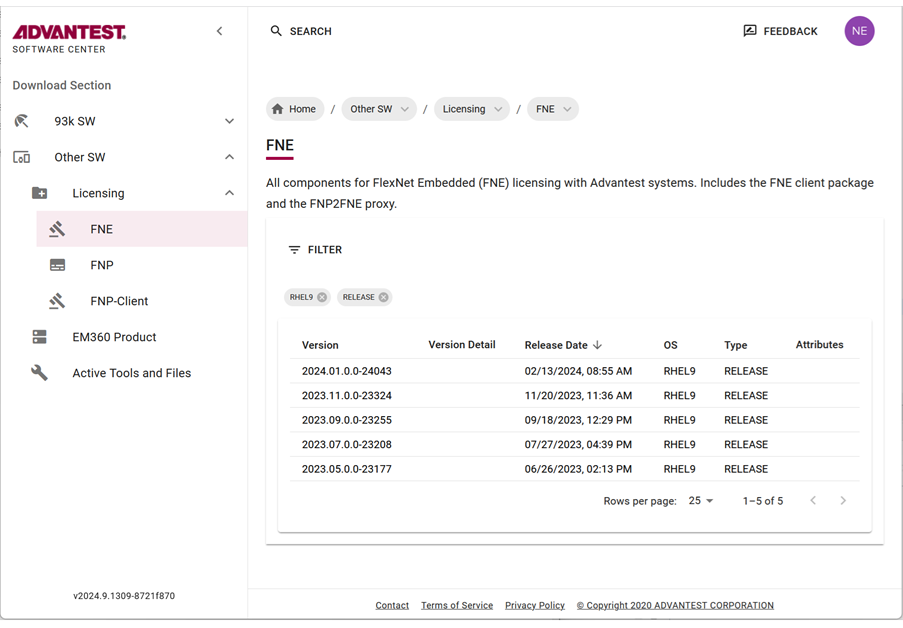
- Scroll to and select the license type FNE and the version you want to install and expand to display the details.
- Create an empty installation directory. For example:
/tmp/smartest_pakages
- Download the archive package by clicking the

 icon.
icon.
The selected license (tar.gz) package is downloaded to your browser's download folder.
Example FNE packages include:
fne_2024.01.0.0-24043_rhel9.tar.gz
- Move the downloaded archive packages to the installation directory:
/tmp/smartest_pakages
- Unpack the archive with the command:
tar xvzf package-name.tar.gz
For example:
tar xvzf fne_2024.01.0.0-24043_rhel9.tar.gz
The installation script is extracted, for example:
install-fne-2024.01.0.0-24043-rhel9.sh
- Check the downloaded archive package for integrity:
bash install-fne-date-version.sh test
- Shut down the SmarTest Work Center.
For details see Shutting down SmarTest.
- Install the client package:
sudo sh install-fne-date-version.sh client
For example:
sudo sh install-fne-2024.01.0.0-24043-rhel9.sh client
Note: During upgrading and updating, the installation script can be called without any option. All installed packages are detected automatically and updated if applicable.
- Optional: Remove the installation directory. For example:
rm -rf /tmp/smartest_packages
- After the installation has completed, configure the license server configuration file where the list of FlexNet Embedded license servers are listed in a prioritized order.
Open the configuration file in an editor: /etc/fne/client.conf
Syntax of the client.conf file:
-
Local license server
#Configuration of FNE servers to be used
# primary FNE server
server
{
name = "FNE on localhost"
url = "localhost"
}
-
Remote license server
#Configuration of FNE servers to be used
# primary FNE server
server
{
name = "FNE central server"
url = "hostNameLicenseServer.domain"
}
#secondary FNE server
server
{
name = "FNE remote server"
url = "socbu158.advantest.com"
}
Keywords for the
client.conf file:
- include
- Used to include another configuration file.
include can be used multiple times in a file.
- server { }
- Used to specify a server description with brackets enclosing each description.
server { } can be used multiple times in a file.
- name
- Free text used to add a description for a server.
- selector
- The client must comply with all listed selector conditions before the client can attempt to contact the server.
selector can be used multiple times in a file.
- url/primaryUrl
- url used to address for the server if only one server is configured. Use primaryUrl instead for the primary server when more than one server is configured.
- failoverUrl
- Used to address the failover servers.
- mute
-
Used to suppresses connection-related error messages for the corresponding server.
Other error messages are displayed.
Some FNE servers listed in client.conf files may be unavailable by intent, for example, emergency servers or temporary servers. If these servers are not running or disconnected, associated error messages are normally displayed at each checkout request, which can be unhelpful if it is an expected situation.
Note: The mute keyword is not supported by older FNE subsystems and is ignored if specified. For FNE subsystem versions that do not support the mute keyword, a syntax warning might be displayed and can be ignored.
- Enter the names and URLs for all FlexNet Embedded license servers that you want to use in their order of priority.
- To verify the installation and license server configuration enter the command:
/usr/local/bin/fne-list-licenses
The tool iterates through the FlexNet Embedded servers defined in /etc/fne/client.conf and lists all licenses (used and available).
It also provides detailed information about the available licenses including:
- Content of the AssetScale tokens
- Locking of licenses
- Expiry information
Note: The fne-list-licenses tool does not show details from cloud license servers.
For details, see fne-list-licenses.
Results
You have installed the license client software and configured the list of FlexNet Embedded license servers in a prioritized order.
The order in which clients attempt to check out licenses is the same order in which the licenses are referenced in the client.conf file.
Example
Example of a client.conf file:
#Configuration of FNE servers to be used
# Emergency Server
include "/etc/fne/emergency.conf"
server
{
    name = "Local cloud space"
    url = "localcloud.company.com"
}
server
{
   name = "My cloud"
   selector = "DeviceOwner:MyCompany"
   url = "https://MyCompany.advantest.cloud:7070"
}
server
{
    name = "Local license server"
    primaryUrl = "fne1.company.com"
    failoverUrl = "fne2.company.com"
}
Minimum client.conf file configuration:
server
{
url = "localhost"
}
