
How to check if the FNE server is running
You can check the following:
- Is the FNE server running?
Note: if you have an FNE failover setup, you need to check this for the FNE primary and the FNE failover server.
- Are licenses provided?
Note: Using both tools provided in the sections "1. Is the FNE server running" and "2. Are licenses provided?" below, your customer can use a monitoring tool to check, if the FNE license server(s) are okay and providing licenses.
- For failover setup: when is the maintenance end reached?
This is an optional check, for the case you want to know when the maintenance end is reached by the failover, when the primary server is down.
1. Is the FNE server running?
If you want to check, if the FNE server is running, you can use the :7070/ping REST API. In a browser enter
http://<FNE_hostname>:7070/ping
For a failover setup you have to do this for the primary and the failover FNE server!
Output in the browser, if the server is running:
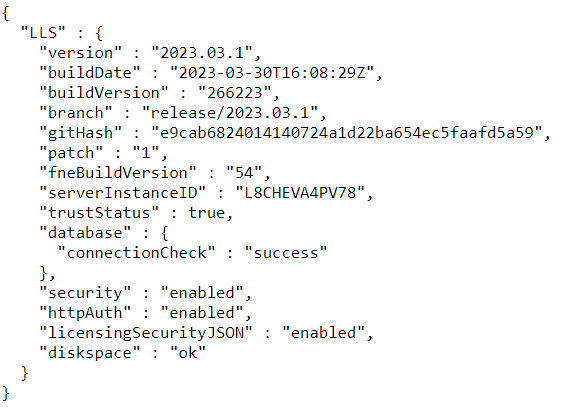
If it is not working, then you get an error page.
2. Are licenses provided?
Note: the tool test_license_checkout can be used after FNE server registration.
In order to check, if the license checkout is working, you should use the tool test_license_checkout, which is also available on the FNE license server. Just checkout the dummy license with
test_license_checkout -f dummy -t 0
Example for a successful checkout:

Check for the "OK 1 x dummy" line. If it is available, the checkout was successful.
3. For failover setup: when is the maintenance end reached
With the following command executed on the failover server you can get the date/time when the maintenance of the failover ends.
/opt/flexnetls/socbu/fne-get-config -1 maintenanceEndTime
If you get as output
1970-01-01T00:00:00.000Z
then the failover is not (yet) active.
Example output for an active failover executed on August 7th, showing that the maintenance will end on August 17th:
2023-08-17T13:02:28.000Z