
Terminal commands questions
Subtopics
- What FNE commands are available?
- How do I get a list of FNE licenses available on my FNE license server?
- How to set up a simple hostname- fne-failover-setup ERROR: The simple hostname (<hostname>) may not contain dots
What FNE commands are available?
FlexNet Embedded license administration
Use on an FNE server the command
apropos-fnx
or for older FNE versions
apropos-fne
to get a list of commands.
With man <command> you can view the man page.
Here is a list of commands - status 14-March-2023 - alphanumerically sorted
advantest-fne-proxyYes, for starting and stopping the service.
No, if you systemctl with command status or help.
sudo systemctl \[command\] advantest-fne-proxy with command:
startstoprestartstatushelpThis is the service for the FNX server (proxy). The proxy needs a running FNE license server. In order to access the FNE license server the proxy reads the file
/etc/fne/client.conf
and connects to the FNE license server in order to checkout there the customer licenses (if enough licenses are available).
advantest-fne-serverYes, for starting and stopping the service.
No, if you systemctl with command status or help.
sudo systemctl \[ command \] advantest-fne-server with command:
startstoprestartstatushelpThis is the service for the FNE server, providing the licenses to the SmarTest clients either
advantest-fne-server-viewerYes, for starting and stopping the service.
No, if you systemctl with command status or help.
sudo systemctl \[ command \] advantest-fne-server-viewerwith command:
startstoprestartstatushelpThis is the service for the FNE server viewer.
This service is optional. It is a viewer to check what is available on the FNE license server and allows the synchronization with the Advantest back-office manually (via online connection or with uploading bin files). For check in and out of licenses this service is not needed.
fne-failover-setupOnly for a failover setup.
Execution on the primary license server! Executed on the primary license server to pair the primary license server with the failover license server (both needs to be get acquainted).
The user which executes this command on the primary license server, needs to have access to the failover server: you need to enter the password of this user several times for the failover and primary license server.
Needs to be executed before the registration!
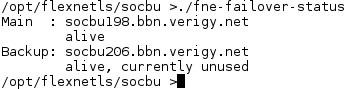
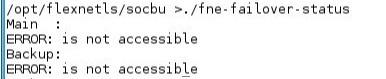
fne-failover-statusOnly for a failover setup.
Output is reasonable after registration of the FNE server: Before registering the FNE server you will see the error message "ERROR: Role of <failover-server> is not BACKUP".
Example for a good status:
Example for a bad status:
fne-get-configfne-get-config \[option\] <key>
with option:
--i[nstance]: Read value from instance level
--p[arent]: Read parent(/original) value
--s[howconfig]: Show complete configuration
--h[ostid]: Show hostid of server
--t[rusted-storage]: Show the status of the trusted storage the FNE server is using
--d[etails]: Show company details (i.e. company name)
--m[achine]=host: Direct requests to this machine
--1: Show information for instance 1
--b[uild]: Show detailed information om server build versions
--help: Show this text
--v[ersion]: Print tool version
with key:
Examples:
/opt/flexnetls/socbu/fne-get-config --h
Outputs the host ID of the license server.
/opt/flexnetls/socbu/fne-get-config --t
Output is true, if the trusted storage is okay.
/opt/flexnetls/socbu/fne-get-config --d
Output is the company name the serve is registered to (also visible via the FNE server viewer: the Company name in the Vendor String of the Company_Details license)
/opt/flexnetls/socbu/fne-get-config --1
Example for an output (explanation is provided in green color and does not belong to the output):
id 219
serverInstanceId R1MNQVVF8UEN
requestId 1
enterpriseId 15209089
pendingDeletion false
maintenanceEndTime 1970-01-01T00:00:00.000Z
suspended false
ready true
hostUUID c2ea23f8-d367-43b5-8034-8a1a35425a27 => This is a unique identifier which is also held in the Advantest back-office for identification
publisherName socbu
lastUpdateTime 2023-04-18T20:27:47.000Z
failOverRole MAIN => The failover shows here the value "BACKUP"
lastClientDropTime 1970-01-01T00:00:00.000Z
lastSyncTime 1970-01-01T00:00:00.000Z
lastServerToServerSyncTime 1970-01-01T00:00:00.000Z
identityName socbu
/opt/flexnetls/socbu/fne-get-config --b
Example for output:
2023.03.0.0 build/fne 266719/54
/opt/flexnetls/socbu/fne-get-config --b
Provides the version of the tool fne-get-config. Example for such an output:
fne-get-config version 2022.09.0.0.23067
fne-handle-response--upload: Upload response file to local FNE license server
--show: Show content of response file
--notitle: Omit title line in listing (for scripting)
--help: Show the options
--version: Print tool version
Load the bin file to the FNE server (instead of using FNE server viewer):
fne-handle-response --upload xyz.bin
Show the content of the bin file
fne-handle-response --show xyz.bin
fne-list-licensesfne-log-collect fne-proxy-setupfne-rulesfne-server-viewer fne-show-license-usageno option: shows licenses borrowed by the local machine
--a[ll]: show licenses borrowed from all clients
--feature=<xyz>: shows usage of a specific feature
--v[ersion]: prints the version of the tool fne-show-license-usage
(and more: usage -help on the command to get all options)
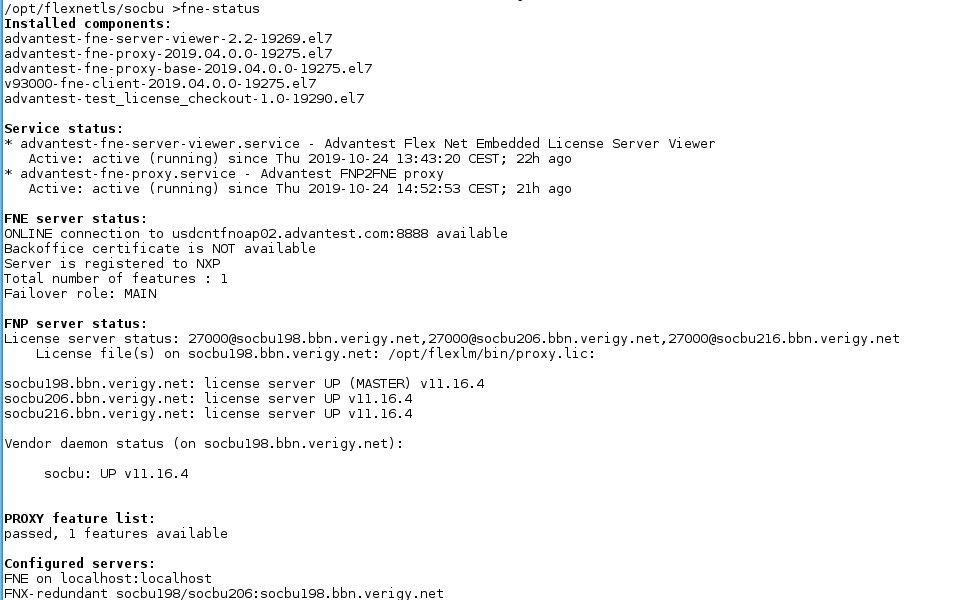
fne-statusExample for triad FNX server:
register-fne-serverRegisters the FNE server in the Advantest Licensing Back-Office (FNO).
Needed after installation.
reset-fne-serverwith path:
/opt/flexnetls/socbu/
showconfig-fne-serverwith path:
/opt/flexnetls/socbu/
showlog-fne-serversync-fne-servermerge_fnp_logsHelper script to add complete timestamps and merge FNP logfiles# This tool merges multiple logfiles by time and date# Please take care with huge logs
with path:
/opt/flexlm/bin/
fnx-checkThis tool checks for features available with FNE, but not supported by the advantest-fne-proxy
with path:
/opt/flexlm/bin/
How do I get a list of FNE licenses available on my FNE license server?
You can use the FNE server viewer > Features.
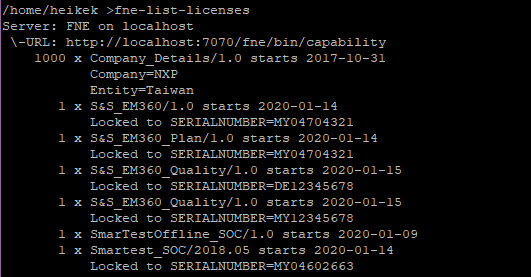
Alternatively you can use the command fne-list-licenses
There are a bunch of options like providing the output with a separator like comma possible, please check with man fne-list-licenses the manual page.
Examples:
Without any options you get all licenses:
With option --feature you can look up a special license:

Features are case-sensitive. If you enter fne-list-licenses --feature=smartest you will not get an output.
See the manual page for more examples.
How to set up a simple hostname - fne-failover-setup ERROR: The simple hostname (<hostname>) may not contain dots
if you enter the command hostnamectl status
you should get for the simple/static hostname only the simple hostname like licfne01 on the appropriate server.  The simple/static hostname must not contain a dot when setting up an FNE failover setup. Example for a good output:
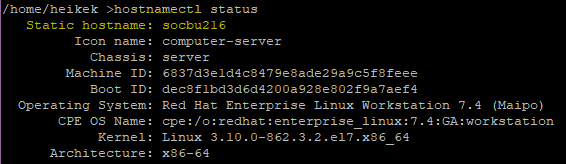
In the screenshot above the simple/static hostname is socbu216 only.
If there is a dot in the simple hostname, then you can change it with hostnamectl set-hostname <name>
Check with command hostnamectl status
afterwards, if the name changed. Please also check, that the fully qualified hostname is still available with hostname -f
Example for good hostname -f output:

Note: Do not use localhost or localhost.localdomain as hostname for an FNE license server!