
Operating System
Subtopics
- How to check if the system is synchronized?
- How to configure RHEL7 with ntp?
- How to configure RHEL9 with chrony?
How to check if the system is synchronized?
On RHEL7 the time synchronization is done via ntp and on RHEL9 via chrony. For license checkout either the license server(s) and the clients need to be synchronized timely.
Please check with
timedatectl
if the system is synchronized.
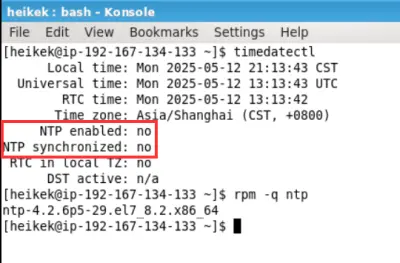
In the screenshot above the system is not configured for time synchronization and ntp is disabled.
How to configure RHEL7 with ntp?
Note: In general customer IT is responsible to set up the time synchronization. The information below is just for your convenience, but is not part of GLPT support.
Prerequisite:
You need a reliable time server.
Steps to be checked:
-
Check if ntp is installed with
rpm -q ntp
If it is not installed, you can try to get it withsudo yum install ntp -
open
/etc/ntp.confwith an editor (you need editing permissions orsudorights)
Here you can add the NTP server with adding the line
server hostnameiburst
Example:server time.google.com iburst -
Check if ntp service is enabled / started with
systemctl status ntpd
If it is not started / enabled-
Enable ntp service for being started with a reboot:
sudo systemctl enable ntpd -
Start ntp service with
sudo systemctl start ntpd
-
-
Check the time synchronization:
sudo ntpq -p
The ntpq command queries the ntp servers defined and you get with option -p a table back with statistics. -
Check with
timedatectl, if ntp is enabled and synchronized.
If ntp is still not enabled, use:sudo timedatectl set-ntp truesudo systemctl start ntpd
Wait a minute and check withtimedatectlagain.
Addition from user experience
From user experience: even with configuring, enabling and starting the ntp daemon the synchronization status was still no (because the time servers configured had an offset). Using
sudo systemctl stop ntpd

sudo ntpd -gq

sudo systemctl start ntpd
helped here. The options are for (see also https://www.tekopolis.com/sync-ntp-immediately-linux/)
-
option -q: overrides the built in sanity check of 1000s. If the system time is over 1000s off from the configured server time, the ntpd process would quit otherwise.
-
option -q: for quitting the daemon after the clock has been set
How to configure RHEL9 with chrony?
Note: In general customer IT is responsible to set up the time synchronization. The information below is just for your convenience, but is not part of GLPT support.
Prerequisite:
You need a reliable time server.
Steps to be checked:
-
Check if
chronyis installed withrpm -q chrony
If it is not installed, you can try to install it withsudo yum install chrony -
open
/etc/chrony.confwith an editor (you need editing permissions or sudo rights)
Here you can add the time server with adding the lineserver hostname iburst
Example:server time.google.com iburst -
Check if
chronyservice is enabled / started withsystemctl status chronyd
If it is not started / enabled-
Enable
chronyservice for being started with a reboot:sudo systemctl enable chronyd -
Start
chronydservice withsudo systemctl start chronyd
-
-
Check with
timedatectl, ifchronyis enabled and synchronized.