Introducing the new License Platform for V93000 Tester
Content
- Motivation and customer benefit
- Terminology, technology, and a common approach
- Efficient license management: Renewal & changes
- Customer self-rehosting 24x7
- Overview - New features: FNP vs. FNE or FNX
- High-level migration sample
- As-is architecture cases
- Target architecture options: FNE or FNX
- Migration decision path
- Migration option-matrix
- Migration chart
- Migration roadmap, milestones, and next steps
- FNE/FNX license server requirements
- FNE/FNX network settings
- Project status summary report: Sample
Motivation and customer benefits
Motivation:
Advantest has put a new license application into operation from the 3rd party vendor Revenera, formerly
Flexera.
Customer benefits with the new license platform - technical perspective:
•
- Drastically reduced license management efforts for renewal & changes:
automated online process or simple file handling on the HTTP level• - Once activated, contract licenses are automatically renewed with the annual renewal
• - Self Service for license rehosting
• - State of the Art tool with optimized GUI user-interface
Further customer benefits - commercial and operational points:
•
- Free off-charge migration; - lead and support from Advantest with a professional project team and
established processes
•
technical failures and risks to a great extent.
Terminology, technology, and a common approach
Terminology and technology differences:
- The currently installed legacy license platform is called ‘FLEX NET PUBLISHER’ or FNP
- The new license platform is called ‘FLEX NET EMBEDDED’ or FNE
- Difference: FNE and FNP license servers are entirely different tools. FNE uses regenerative (replacement) licensing, whereas FNP uses iterative licensing (via dynamic license pools).
Common approach:
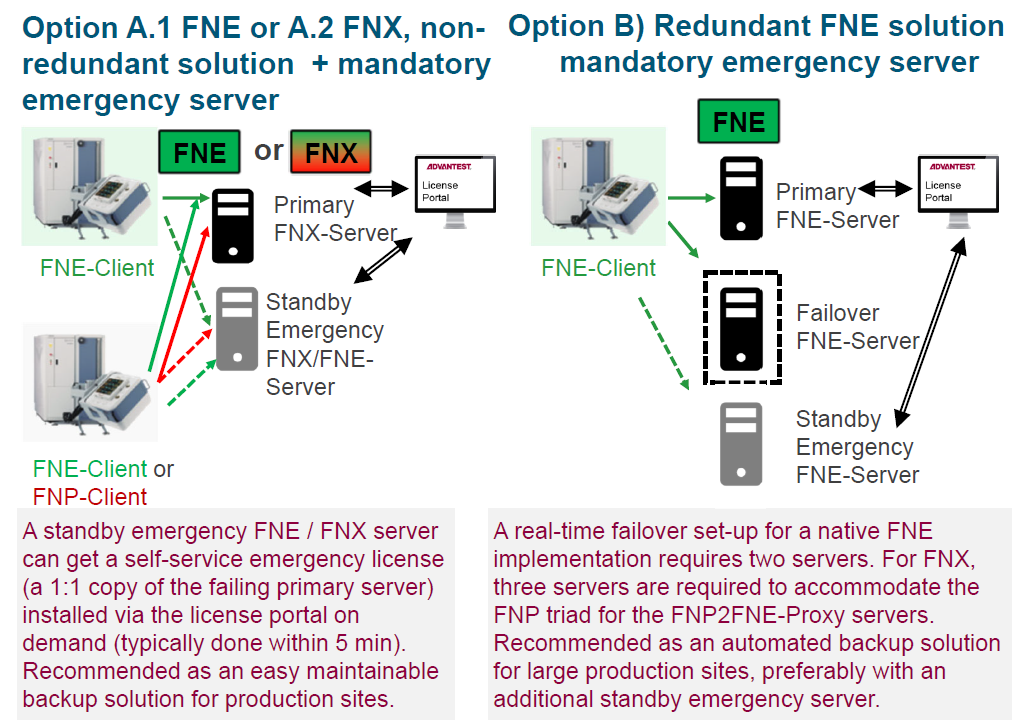
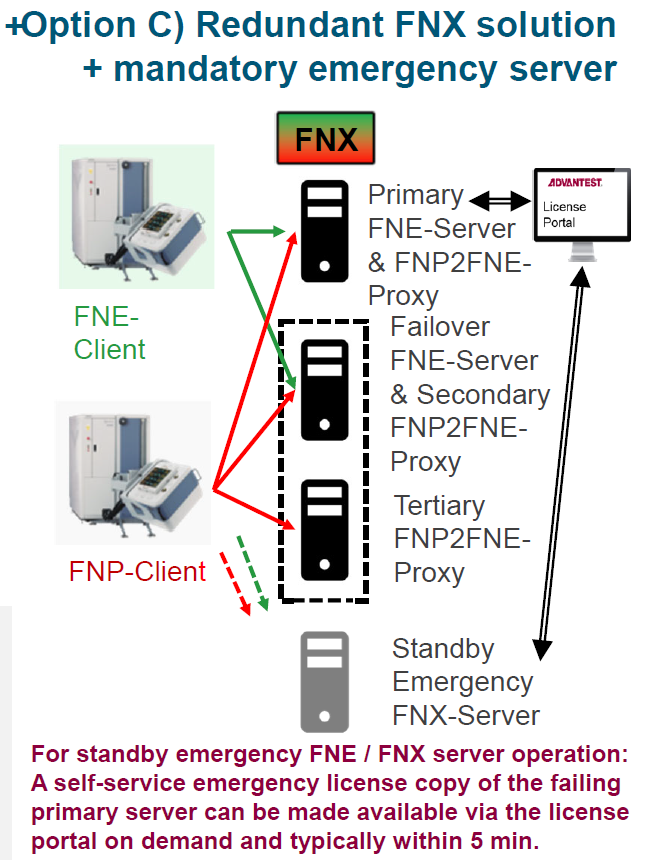
- As for older client tester tools (Smartest versions <7.6), which are not migratable to FNE, a so-called Proxy license platform solution becomes necessary; the acronym hereto is FNX
- The Proxy license platform can handle all the Smartest releases from FNE and FNP license types; this ‘mixed’ or ‘hybrid’ approach is the most applicable customer solution. See the graphic on the right-hand side.
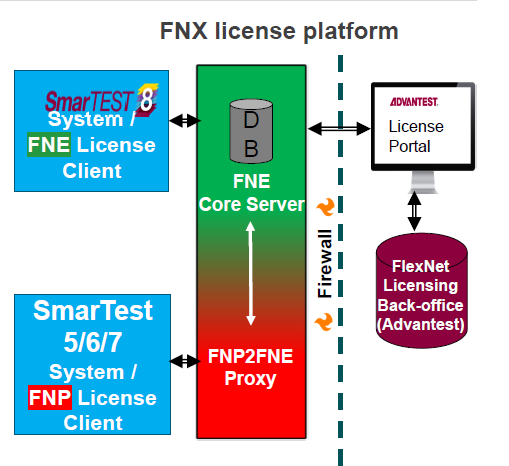
The Proxy Server efficiently converts the new license binary data format into the older binary data format for SmarTest 6/7 when a request is sent from the tester client.
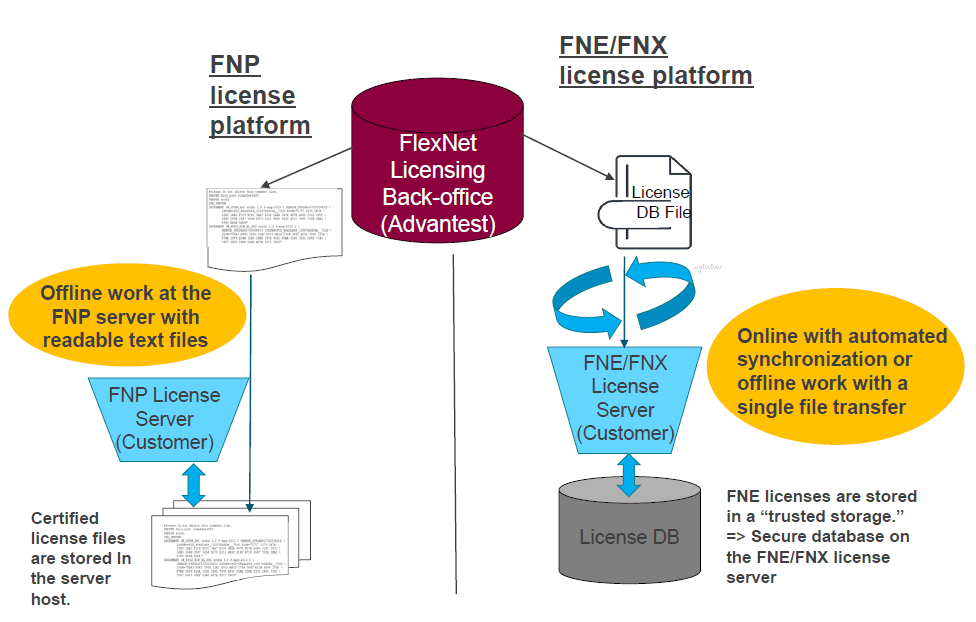
Efficient licenseLicense management:Management: Renewal & changesChanges
With FNE/FNX license management means:
- With an online connection to Advantest’s back-office server, zero efforts for annual license renewal are necessary
- Without an online connection, all transfers from the back-office server will be done within a single file
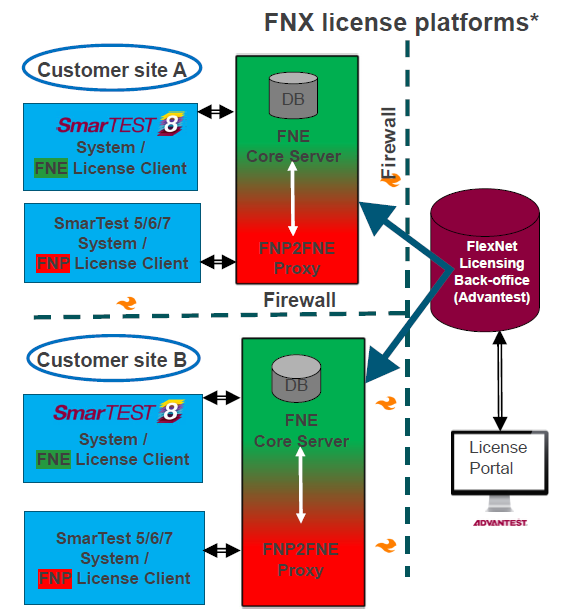
Customer self-Self-rehosting 24x7
Customer self-rehosting of test tool licenses from site A to site B and vice versa
*also works for FNE platforms or in combination: FNX/FNE
Overview - newNew features: FNP vs. FNE or FNX
| FNP | FNE | |
| Technology | Revenera (aka Flexera) aging technology > no support on FNP from vendor Revenera | The state-of-art technology from Revenera (aka Flexera) |
| Format | Multiple ASCII license files (incremental licensing) > Inefficient license management (e.g. manual handling of license files) | Single binary license file / database container (regenerative licensing) > Efficient license management |
| Annual renewal effort |
Required to clean up license duplicates > mainly from rehosting of licenses Manual effort every year Need to manage licenses on a single license file & entitlement level. |
Significantly less effort (simple server synchronization) Zero effort with online connected FNE server Allows to manage licenses on server-level Once activated, contract licenses are automatically renewed with the annual renewal |
| Rehost | Rehosting of licenses only via "service ticket" >Service charge fee needed | Supports self-rehosting for customers 24x7 |
| Management | No GUI tool for license management | Provides state-of-the-art GUI based tools for efficient license management (FNE server viewer) |
| Stability | License clients need to keep permanent connection with Server | Increased robustness > More suitable for global license server set-ups and cloud licensing |
| SmarTest Support |
SmarTest 5/6/7/8
|
SmartTest 5/6/7/8, all V93000, all license models > FNE is fully backwards compatible with all existing SmarTest 5/6/7 releases via FNX server (FNE + FNP2FNE Proxy Server) > supports all V93000 generations > supports Device Specific Licensing and Cloud Licensing > Required for EXA Scale and for advanced license models (device specific licensing & cloud licensing) |
High-level migrationMigration sampleSample
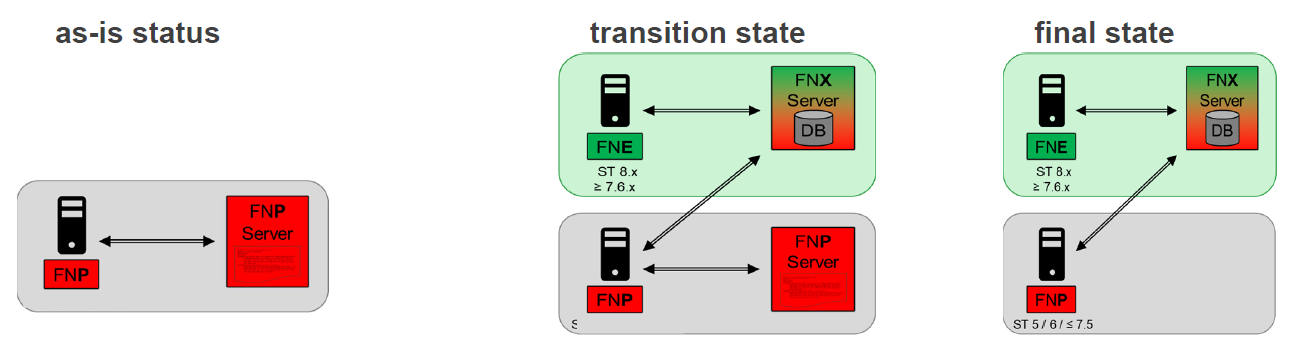
Critical points for migrations:
- For production migration without interruption, a new set of Servers / or virtual machines is required; - or at least for a workaround, a temporary Server set
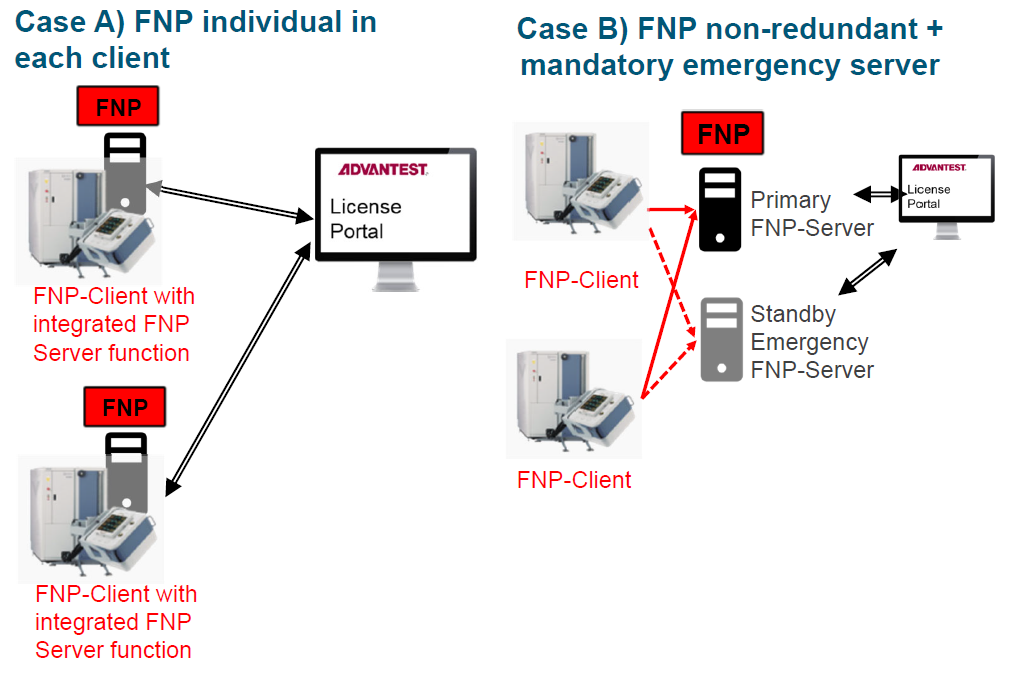
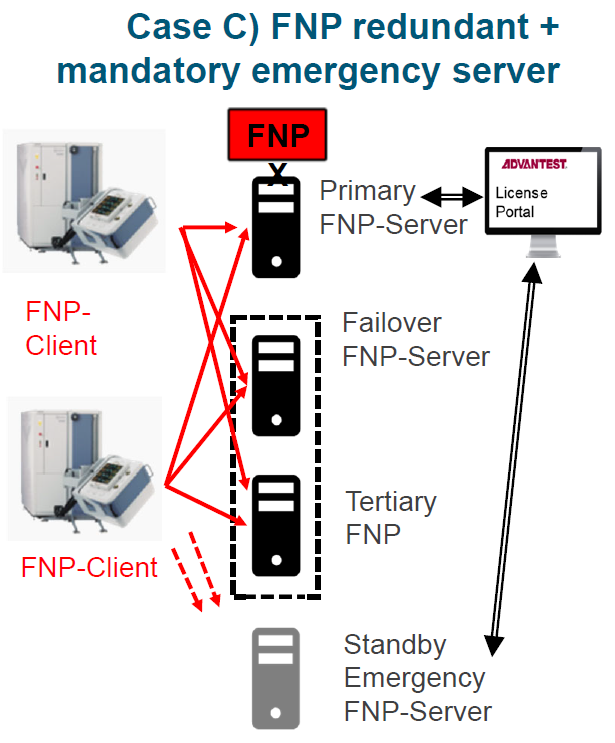
- For the Customer, an individual new or new server architecture solution will be proposed by Advantest experts, derived from the as-is architecture, i.e.(single Server vs. failover, online vs. offline, new FNE vs. FNX Server; - for more details, see next slide
- Selective existing licenses need to be migrated from FNP to FNE format
- With the parallel migration approach, a smooth switchover of individual tester clients is possible
As-is architecture cases
Target architectureArchitecture options:Options: FNE or FNX
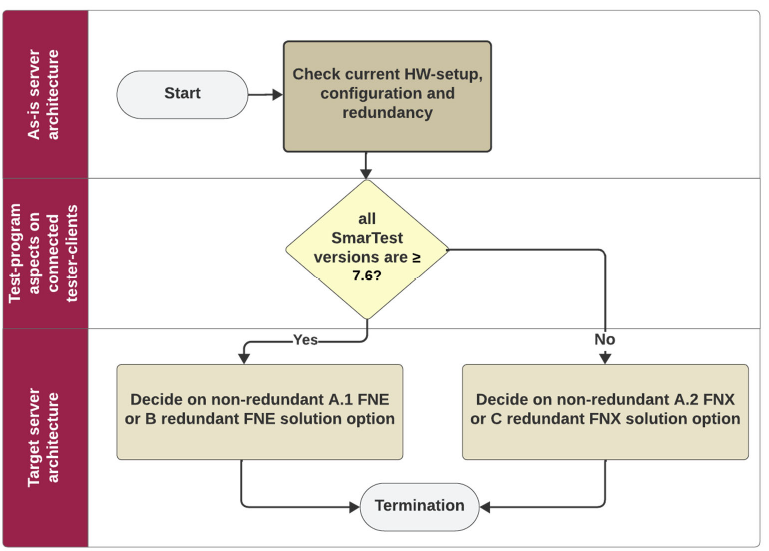
Migration decisionDecision pathPath
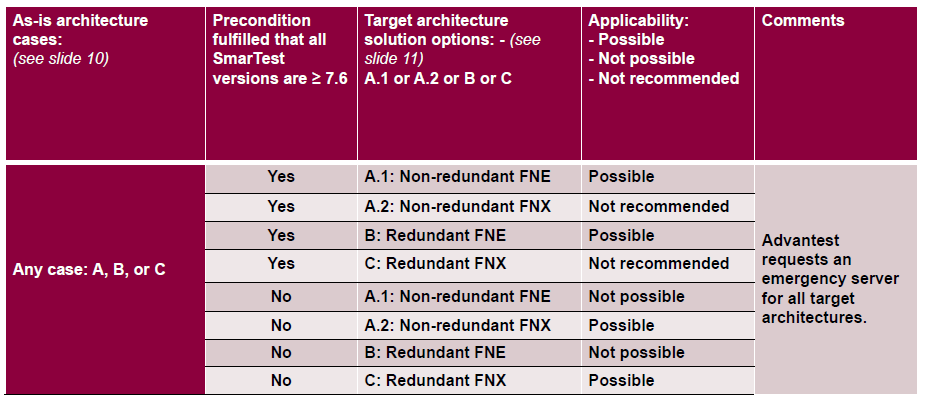
Migration option-matrixOption-Matrix
Migration chartChart
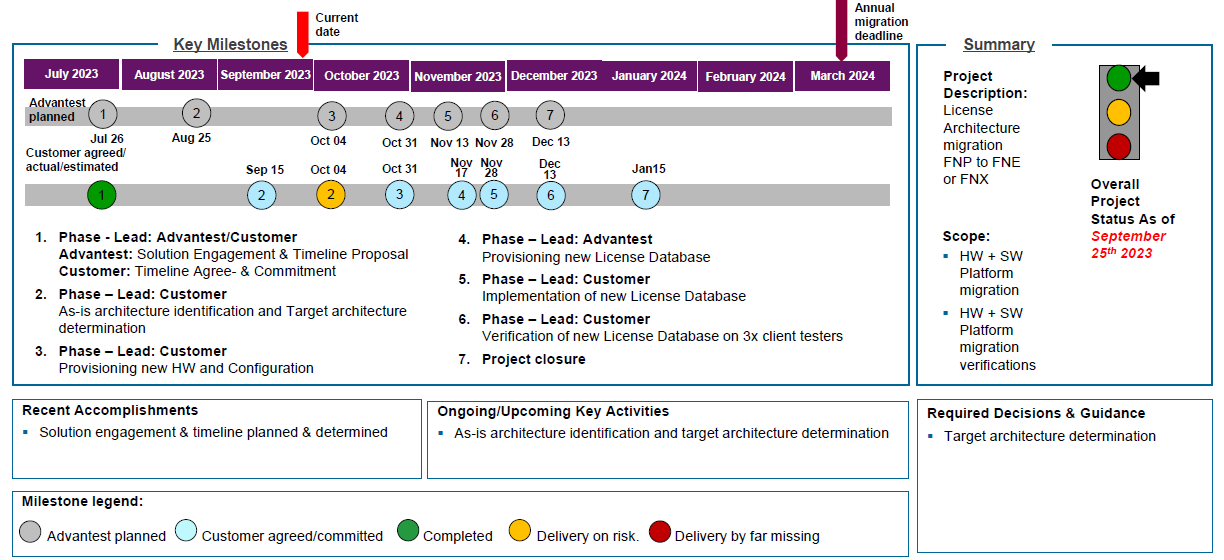
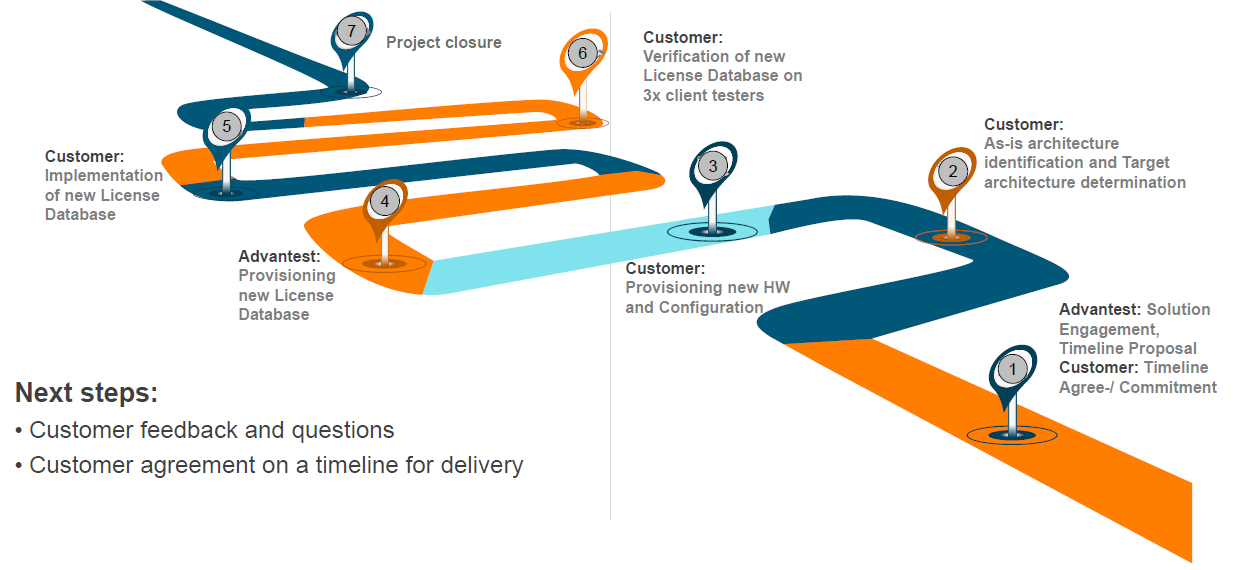
1. Solution Engagement, Timeline Proposal and Customer Timeline Commitment
- Advantest presents migration motivation with technical guidelines
- Advantest proposes project timeline
- Customer gives feedback on a suitable/agreed timeline
2. As-is architecture identification and Target architecture determination
- Customer checks its current setup, configuration, and SmarTest versions
- Customer decides on its target solution and communicates it to Advantest
3. Provisioning new HW and Configuration
- Customer sets up required HW and network configuration and confirms its readiness
- Customer downloads and installs new License Server Application SW
- And does a 1st. registration at Advantest’s Portal, where he receives a 1st dummy license for testing
- Customer fills out license data migration form and provides it to Advantest
4. Provisioning new License Database
- Advantest runs the license data migration process, and parse data to safeguard error-free database
5. Implementation of new License Database
- Customer loads new License database into target systems
- And does, in case of an error, an exception handling with Advantest support
6. Verification
- Customer runs a new Configuration File for FNE or FNX tester clients
- And checks the functioning of the new setup
Migration roadmap,Roadmap, milestones,Milestones, and nextNext steps
FNE/FNX license server requirements
Hardware minimum configuration:
- Quad core CPU, 8 GB RAM
- Free hard disk space
o Primary & Failover FNX Server: 12GB (FNE) + 12GB (FNX/FNP)
o Tertiary FNP Server (incl. FNP2FNE proxy software): neglectable (< 100MB)
o Local license server with FNE/FNX on system controller as Hypervisor / VM set-up: 5GB (FNE) + 5GB
(FNX/FNP)
Operating system minimum configuration:
- Red Hat Linux 7.2 or newer
- Root access for installation
- Java 8
- License server must use fully qualified hostname (command hostname -f must not return localhost)
Tester Controllers suitable for local license servers:
- Z4 G4, Z640, Z620
FNE/FNX networkNetwork settingsSettings
| FNE / FNX server: | Port |
Protocol |
Online Connection to Advantest’s License Portal (license.advantest.com): 7077 HTTP -> enables online connection for fully automated renewal 443 HTTP
Project Status License Migration Sample
| Phase | Project phase | Lead | Period | Proposed timeline | Customer agreed timeline |
| 1 |
-Solution Engagement & Timeline Proposal
|
-Advantest
-Customer |
-1day
-7days |
-17th Oct 2023
-24th Oct 2023 |
? |
| 2 |
As-is architecture identification and Target | Customer | 2 weeks | 07th Nov 2023 | ? |
| 3 |
Provisioning new HW and Configuration | Customer | 1 month | 07th Dec 2023 | ? |
| 4 |
Provisioning new HW and Configuration | Advantest | 3 days | 12th Dec 2023 | ? |
| 5 |
Implementation of new License Database | Customer‘s representative name | 2 weeks | 26th Dec 2023 | ? |
| 6 |
Verification of new License Database on 3x client testers |
Customer‘s representative name | 2 weeks | 09th Jan 2024 | ? |
| 7 |
Project Closure | Advantest/Customer‘s representative name | 1 week | 16th Jan 2024 | ? |
Project Status Summary: Sample