
What can I do, if there is a connection issue with the license portal
There are several types of connection issues:
- There is a message "server connection lost" message at the top of the license portal.
- The blue progress bar at the top of the screen is not moving anymore.
- You are getting an error message with error code 9999.
Example:

Here you can view the error code 9999, which is used for time outs. - You are getting an error message hinting out a connection issue.
Example:
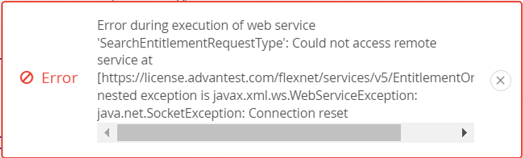
Here you can view the keyword "Connection reset", which indicates a connection issue.
Best practices:
- In general, never open several license portal sessions neither in the same browser nor in another browser.
- For 1. and 2. please wait. Do not close the browser tab.
Please do not open another license portal session, also not in a different browser as this will just add more load.If it takes too long, please inform the Global Platform Licensing Team via a PIT ticket and if it is outside the German office hours, please open a helpdesk ticket with the following information: see below. - For 3. and 4. please close the error message and log out.
Please try the same action some time later.
If the error remains, please informtheyourGlobalAdvantestPlatform Licensing Team via a PIT ticket and if it is outside the German office hours, please open for the cases listed above an helpdesk ticket with the following information: see below.