
Signing in to the License Portal
You must be signed in to the Advantest License Portal to access license portal functionality. An associated account is necessary.
Before you begin
You must know your Advantest customer credentials, which are based on your email address.
Password reset is possible on the general Advantest License Portal Login page.
All entries in the login screens are case sensitive.
Login credentials are the same as for the AdvantestmyAdvantest login.
Procedure
- Sign in to the Advantest License Portal by opening the following URL in a Web browser (Chrome or Firefox):
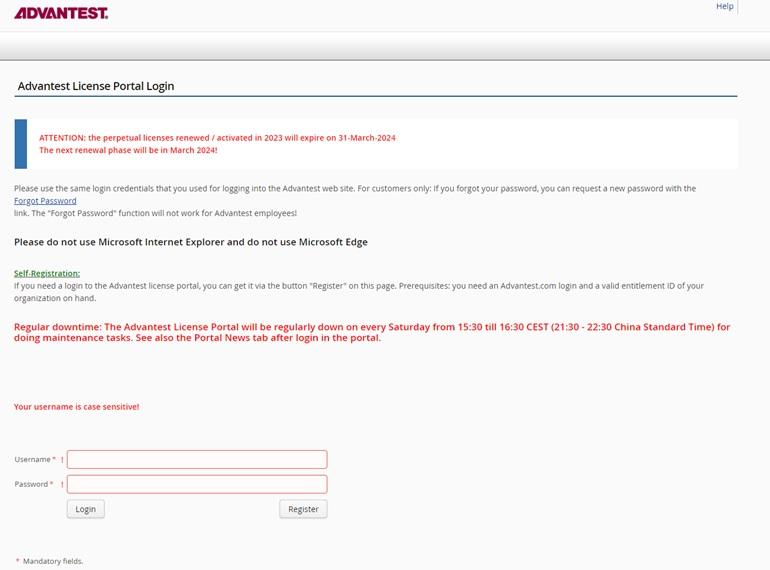
Note: You require a registered account to be able to sign in. Alternatively, click Register and complete the registration process with myAdvantest username a valid entitlement ID. If registration fails, contact your Advantest representative providing your myAdvantest username (do not provide your password), and the error message you received during signing on.
Results
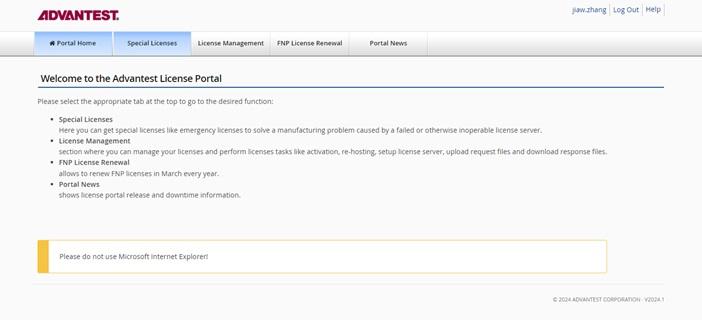
This opens the Advantest License Portal page, giving access to:
- Special Licenses (Advantest employee only)
- License Management
- FNP License Renewal
- Optional: Cloud Server Status
- Portal News
What to do next
To sign out after you have completed your tasks, click Log Out in the upper-right corner.