Client configuration and license management
License configuration and license management on a license client provide you with the tools and utilities to help you to administer licenses and troubleshoot licensing problems on your test systems.
For License configuration and license management tasks you must differentiate between two license types:
- System licenses: enable you to scale test system capabilities, like speed and memory.
- Software licenses: cover SmarTest release streams and service and support software tools.
Related information:
Installing the FLexNet (FNP) license client
Installing a FlexNet Publisher (FNP) license client used to provide the activated licenses to a SmarTest installation on a system controller workstation requires two steps: the installation of the license client software itself on the SmarTest host system, and configuration of the license server configuration file to prioritized the order of server access.
About this task
The following procedure explains how to install the FlexNet client.
Before you begin
The license client is the SmarTest software. The FlexNet license server communicates with SmarTest using the FlexNet client.
Procedure
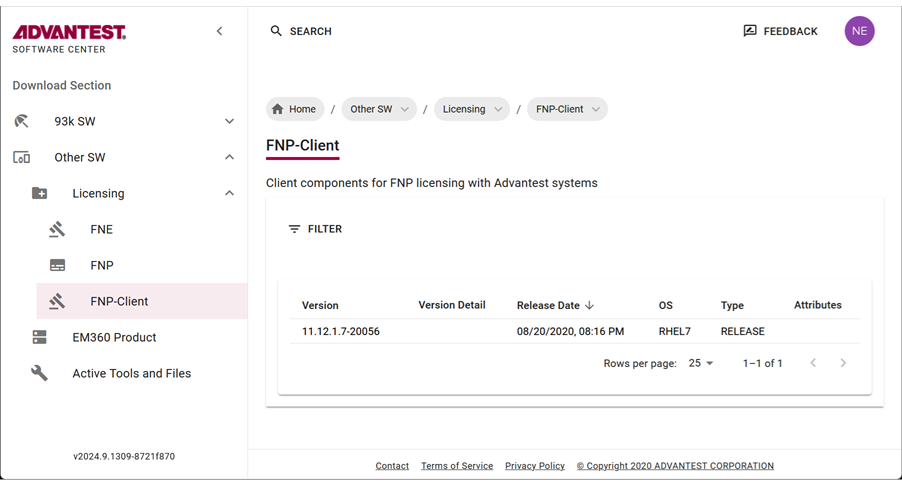
- To get the list of all available Licensing products, from the left menu select:

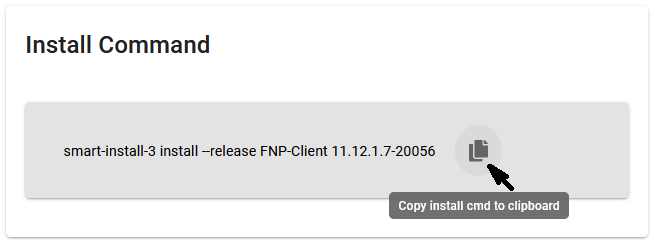
- Copy the installation command to the clipboard by clicking
 .
.
To install the smart-install-3 tool, you need root permissions.
To install software with smart-install-3 version 3.1.6.0 and higher, the user account you are using must be a root-level account or be included in the smartinstall user group or the smart-install-3 command must be run as system administrator (root).
Add a user to the smartinstall user group with the command:usermod -aG smartinstall usernameRunning this command on your workstation installs the package to your system controller. For details, see smart-install-3 command line tool and Downloading SmarTest software.
Alternatively, click on a file. The save file dialog opens, from which you can specify a download location. For details, see Downloading SmarTest software.
- Optional:
- Download the archive package by clicking the
 icon.
icon.
The selected license (tar.gz) package is downloaded to your browser's download folder.
Example FNP Client packages include:
fnp_client_11.12.1.7_20056_rhel7.tar.gz
- Download the archive package by clicking the

Results
You have installed the license client software and configured the list of FlexNet Publisher license servers in a prioritized order.
System .lic license files
Subtopics
System *.lic licenses enable you to scale test system capabilities, such as speed and memory.
All *.lic license files reside by default in the /opt/flexlm/license directory on both the license client and the license server.
The system .lic license file on the client provides the hostname or IP address of the license server for SmarTest and the dedicated vendor daemon value (For Advantest SmarTest, the vendor daemon value is socbu). The vendor daemon value specifies that this license file is associated with the socbu vendor daemon.
To receive a system *.lic license file, you must activate the corresponding license. For details see Activating licenses.
Note: Service and Support (S&S) licenses do not need to be activated.
Checking out licenses from a license server
The procedure for checking out licenses is:
- At startup, SmarTest reads the test program file and resolves the requested capability into required licenses.
- Next, the
*.liclicense files in the/opt/flexlm/licensedirectory on the same workstation are read. The*.liclicense files specify the hostname of the license server, which can be the same workstation in the case of a local license server, or another workstation in the case of a central license server. See Editing .lic license files. - Finally, SmarTest contacts the license server to check if the required licenses are available:
- Available: the licenses are checked out and the features enabled.
- Not available: SmarTest runs the script
license_checkout_failure.
Note: Base capabilities are always available, even without licenses.
Returning licenses to a license server
Licenses are automatically returned the license server when SmarTest is shut down.
Find out HostID and HostName
This topic describes how to find out the HostID and the HostName of the license servers for license activation.
About this task
Note: This topic is applicable to SmarTest 7 and SmarTest 8.
To activate license you need the following information:
- Entitlement Certificate
- HostID of the license servers
- HostName of the license servers
Procedures
Find out HostID
FLEXlm binaries are installed
- Login to as user root:
su rootand enter the root user password. - Open a terminal window.
- Type:
/opt/flexlm/bin/lmutil lmhostid -n
FLEXlm binaries are not installed
The HostID is an 8 digit hexadecimal number (HP-UX or Solaris) or a 12-digit hexadecimal number (Linux). Select from one of the following commands, depending on your OS.
Sun Solaris
- Log in as root and open a terminal window.
- Type:
/usr/bin/hostid
Linux
- Login to as user root:
su rootand enter the root user password. - Open a terminal window.
- Type:
- Linux RHEL 5
/sbin/ifconfig eth0 | grep HWaddr | sed 's/://g' | awk ' {print $NF} ' - Linux RHEL 7
/sbin/ifconfig eno1 | grep "ether" | sed 's/://g' | awk ' {print $2} '
- Linux RHEL 5
Find out HostName
Sun Solaris
- Log in as root and open a terminal window.
- Type:
/bin/hostname
Linux
- Login to as user root: su root and enter the root user password.
- Open a terminal window.
- Type:
/usr/bin/hostname
What to do next
Editing .lic license files
This topic describes how to edit FlexNet Publisher license server related license files (.lic files).
About this task
CAUTION: The editing instructions below only apply to license files referring to a license server. Service and support license files have a different structure and must not be edited.
The .lic license files must reside in the flexlm license directory /opt/flexlm/license/ for both license servers and clients.
The server .lic license file must provide the server hostname and the correct vendor daemon ("socbu").
The .lic file on the license server provides the actual license, while the corresponding client .lic file can contain an additional USE_SERVER statement used to specify the associated license server. When SmarTest reads the USE_SERVER statement from the client .lic file, it ignores everything else in the license file except the preceding SERVER lines and transfers license control to the specified license server. The USE_SERVER statement takes no arguments and should be used in client license files only.
.lic files. When using a central license server, the USE_SERVER statement improves performance compared with setting the LM_LICENSE_FILE environment variable.Note: For information about license server installation, see the section License server setup.
Procedures
Server license files
To edit .lic license files on a server system:
- Copy the
.liclicense file you received to the/opt/flexlm/license/directory on the license server system. - Open the
.liclicense file in an editor. - The SERVER statements specify the hostname and host IDs of the license server systems and the TCP/IP port number of the license server manager (
lmgrd).
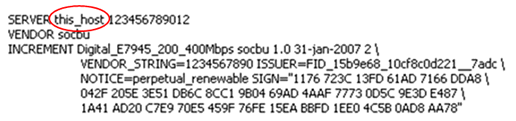
In the SERVER statement, replace the server hostname placeholder string this_host with the hostname of the license server.
The graphic below shows the server string to be replaced.

- Also in the SERVER statement, replace the server host ID placeholder string 123456789012 with the actual host ID of your license server (and optionally the port number of your license server).
Note: For more information about querying the license server hostnames and host IDs, see Find out HostID and HostName.
<host_name> = The license server hostname or IP address returned by the hostname command.
<hostid> = The string returned by the lmhostid command.
[port] = TCP/IP port number to use.If a port must be specified (check with your network administrator), the syntax is as follows:SERVER <host_name> <hostid> [port], for example:SERVER MyLicSvr 8502053d1905 27000-
VENDOR socbu [port], for example:VENDOR socbu PORT=27020
Note: If no port is configured, the client automatically checks all ports from 27000 to 27009. Any other ports must be specified.
Normally a license file has one SERVER statement. Three SERVER statements signifies that you are using a three-license-server redundancy configuration. See License clients and license servers. In a three-license-server configuration you must edit all three SERVER statement entries. - The VENDOR statement specifies the daemon name and should be as follows:
VENDOR socbu.
Client license files
To edit.lic license files on a client system:- Copy the
.liclicense file you received to the/opt/flexlm/license/directory on the client machine. - Open the
.liclicense file in an editor. - The SERVER statements specify the hostname and host IDs of the license server systems and the TCP/IP port number of the license server manager (lmgrd).
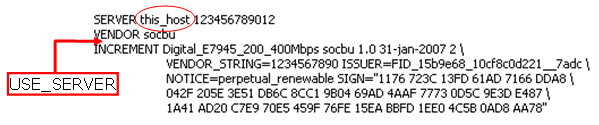
In the SERVER statement, replace the server hostname placeholder string this_host with the hostname of the license server.
The graphic below shows the server string to be replaced.

- Also in the SERVER statement, replace the server host ID placeholder string 123456789012 with the actual host ID of your license server (and optionally the port number of your license server).
Note: For more information about querying the license server hostnames and host IDs, see Find out HostID and HostName.
<host_name> = The license server hostname or IP address returned by the hostname command.
<hostid> = The string returned by the lmhostid command.
[port] = TCP/IP port number to use.
Normally a license file has one SERVER statement. Three SERVER statements signifies that you are using a three-license-server redundancy configuration. See License clients and license servers. In a three-license-server configuration you must edit all three SERVER statement entries. - The VENDOR statement specifies the daemon name and should be as follows:
VENDOR socbu. - The USE_SERVER line in the client license file ensures that the requested license features are obtained from the specified license servers. The license file on the client no longer needs to be in sync with the license file on the server and may even not contain any license information.
Enter the USE_SERVER statement. It takes no arguments.
Note: For standalone systems with a local license server, the USE_SERVER statement is not necessary as both client and server use the
/opt/flexlm/license/* directory. Therefore, the server license file automatically specifies the server for the client (<host_name> = localhost). - Optional: In the client
.licfile only, any license strings below the USE_SERVER keyword are ignored and can be removed. Only the licenses on the servers specified in the SERVER lines are read.
Enabling license logging
Detailed information about license consumption and optimize license usage can be identified by License usage logging.
TestProgramConfig config;
config.enableLicenseLogging = true;
testProgram.loadWithConfig(config);
About this task
To be able to get detailed information about license consumption and optimize license usage, it is necessary to analyze the licensing requirements for memory and speed for each measurement within a test program. From this information, it is then possible to isolate the main license requirements.
License usage logging (incremental over measurements and per measurement logging) provides the information required to establish the licensing dependencies. If the watermark increases in proportion to the measurement data, the test is independent, otherwise it shares data with other tests.
Log data is written to:
/opt/hp93000/soc/system/log/licenseUsage_<sessionId>.log
To read in the data you need to generate a parser based on protobuf library using the grammar in:
/opt/hp93000/soc/system/include/xoc/profiling/licenseUsage.proto
An existing file is not overwritten - only new data is appended to the existing content.
The most valuable data collected by license logging is when you have not previously executed an initial bind before executing the profile configuration. After an initial bind, only dynamic changes are recorded.
Before you begin
Make sure the test program has been loaded.
License logging can only be enabled using a Profile launch configuration.
Procedure
- Click the New Launch Configuration
 button.
 - In the Main tab (default selection), select Enable license logging.


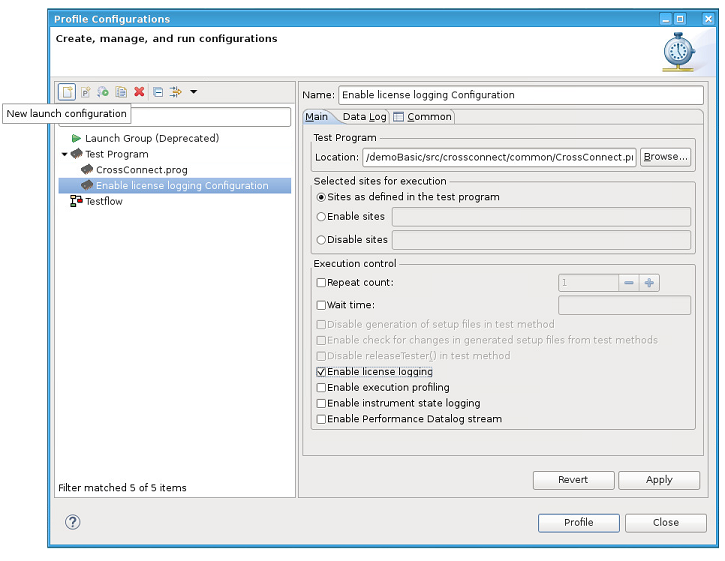
Results
License logging is enabled.
Log data is written to /opt/hp93000/soc/system/log/licenseUsage_<sessionId>.log.
A license usage log file contains the memory contribution (in Bytes) for each signal for each measurement.
Note: License logging can also be enabled and disabled using the Test Cell API.
For example:TestProgramConfig config;
config.enableLicenseLogging = true;
testProgram.loadWithConfig(config);
For details about TestProgramConfig, see TestProgramConfig.
What to do next
The generated log file is user-readable and it is possible to manually extract the licensing requirements for memory and speed for each measurement within a test program. It is not essential to parse this file.
However, for further processing, it can be beneficial to parse the file to arrange its content into a more readable format.
To read in the data you can generate a parser based on the protobuf library using the grammar in:
/opt/hp93000/soc/system/include/xoc/profiling/licenseUsage.proto
For more details, see Reading log file data.
Reading log file data
Log file data contains information, such as memory usage.
About this task
If license logging is enabled, the license log data is written to: /opt/hp93000/soc/system/log/licenseUsage_<sessionId>.log.
The following log example shows the used memory (Pattern or PA = 1032 bytes) for the signal D04. The total accumulated value (accDoubleValue) is 3096 bytes which the total memory used by the complete program.
LicenseUsage.log file example:
measurementName: "Main.GlobalPAPattern.measurement"
measurementTimestamp: "Mon, 01 Jul 2019 15:30:08 -0700"
licensedFeatureLog {
featurePerSignal {
signalList: "D00 + D01 + D02 + D03 + D04"
feature {
feature: "speed"
accDoubleValue: 10000000
unit: "bps"
}
}
featurePerSignal {
signalList: "D04"
feature {
feature: "memory"
accDoubleValue: 3096
doubleValue: 1032
unit: "B"
}
feature {
feature: "sharedMemory"
doubleValue: 60352
unit: "B"
}
}
}
A license usage log file contains the memory contribution (in Bytes) for each signal for each measurement. The accumulated memory value is also recorded.
In the example above:
| Measurement | Main.GlobalPAPattern.measurement |
| Signal names | signal_list: "D00 + D01 + D02 + D03 + D04" |
| Signal requirement type | feature: speed (all signals)
|
| Accumulated speed value | accDoubleValue: 10000000 bps (all signals) |
| Accumulated memory value | acc_double_value: 3096 B (signal D04) |
| Memory value | doubleValue: 1032 B (signal D04) |
| Shared memory value | doubleValue: 60352 B (signal D04) |
This file is in the protobuf (ASCII) format and can be read using a simple parser. For more information, refer to: https://developers.google.com/protocol-buffers/
Note: If you only require the values for a specific measurement, you can read this from the ASCII text manually.
The protocol buffer compiler is installed under /usr/bin/protoc.
The protoc version can be found with the command: /usr/bin/protoc --version
Output example: libprotoc 2.5.0
To structure information, protocol buffer message types are defined in .proto files. The following protobuf file is used for license logging, which can be compiled with the protocol buffer compiler to Java, Python, Objective-C, or C++.
- SmarTest ≥ 8.2.0
-
/opt/hp93000/soc/system/include/xoc/profiling/licenseUsage.proto
Before you begin
Make sure that license logging is enabled. For details, see Enabling license logging.
Procedure
Results
After the above protoc call or make.sh script is run, the following files are created:
- licenseLogger
- Generated Parser Executable
To execute the licenseLogger, use the command:
./licenseLogger <output_file_name> <license_type> <signal>For example:
./licenseLogger licenseUsage.log memory D01 - measurementLicense.pb.cc
- Generated after running protobuf compiler
- measurementLicense.pb.h
- Generated after running protobuf compiler
Example logfile parser
The following code is an example parser for reading license log files and printing the top 10 measurement executions contributing to the specified feature and signal.
Example parser (SmarTest ≥ 8.2.0)
#include <iostream>
#include <fcntl.h>
#include <fstream>
#include <google/protobuf/text_format.h>
#include <google/protobuf/io/zero_copy_stream_impl.h>
#include <map>
#include <iostream>
#include <iomanip>
#include <sstream>
#include "licenseUsage.pb.h"
using namespace std;
using namespace license;
using namespace ::google::protobuf::io;
using ::google::protobuf::TextFormat;
map<double,string> featureValuePerMeasurement;
map<string,double> featureValuePerMeasurementWatermark;
// measurementName, <license string, count>
multimap<string, pair<string,int> > licenseUsage;
// utility to extract signal from signal list into a vector of signals
vector<string> signalsToVector(string& signals)
{
vector<string> items;
const char* t = " \t\n\r\f\v";
unsigned long opos = 0;
unsigned long pos = signals.find_first_of(" + ");
while (true) {
// trim white spaces
string extract = signals.substr(opos, pos - opos);
extract.erase(0, extract.find_first_not_of(t));
extract.erase(extract.find_last_not_of(t) + 1);
items.push_back(extract);
if (string::npos == pos) { break; }
pos = signals.find_first_of(" + ", opos = pos + 1);
}
return items;
}
// Sample method to print Top 20 measurement runs for given feature and signal
// In addition print the license usage after the Top1 measurement was executed.
void printTop20(string& featureKey, string& sigKey)
{
int x = 0;
int mrlen = 0;
for(auto elem = featureValuePerMeasurement.rbegin();elem != featureValuePerMeasurement.rend() && x < 20; ++elem, ++x) {
if(elem->second.size() > mrlen) { mrlen = elem->second.size(); }
}
cout << "Top 20 measurement runs for feature \"" << featureKey << "\" at signal \"" << sigKey << "\"" << endl << endl;
cout << setw(mrlen) << left << "Measurement Run" << " | Value | Watermark Value " << endl;
for(int i=0;i<mrlen;++i) { cout << "-"; }
cout << "-+--------------+-----------------------" << endl;
x=0;
for(auto elem = featureValuePerMeasurement.rbegin();elem != featureValuePerMeasurement.rend() && x < 20; ++elem, ++x) {
cout << fixed << setw(mrlen) << elem->second << " | " << setw(12) << left << setprecision(3) << elem->first << " | " << setprecision(3) << featureValuePerMeasurementWatermark[elem->second] << endl;
}
cout << endl << endl;
string mrName = featureValuePerMeasurement.rbegin()->second;
auto elements = licenseUsage.equal_range(mrName);
auto elem = elements.first;
for(;elem != elements.second; ++elem) {
cout << "Count: "<< setw(6) << elem->second.second <<elem->second.first << endl;
}
}
bool processMessage(string& message, string featureKey, string sigKey)
{
license::MeasurementLicense log;
if (!TextFormat::ParseFromString(message, &log)) {
cerr << endl << "Failed to parse string: " << endl;
return false;
}
string mrName = log.measurementname();
LicensedFeatureLog feature = log.licensedfeaturelog();
for(int i=0; i<feature.featurepersignal_size();++i) {
FeaturePerSignal fps = feature.featurepersignal(i);
string signals = fps.signallist();
vector<string> signalVector = signalsToVector(signals);
for(int x=0;x<fps.feature_size();++x) {
Feature f = fps.feature(x);
if(f.feature() == featureKey) {
for(auto const & sig : signalVector) {
if(sig == sigKey) {
featureValuePerMeasurementWatermark[mrName] = f.accdoublevalue();
featureValuePerMeasurement[f.doublevalue()] = mrName;
}
}
}
}
}
for(int i=0;i<log.licenses_size();++i) {
auto l = log.licenses(i);
for(int x=0; x<l.licensestring_size();++x) {
auto ls = l.licensestring(x);
licenseUsage.insert(make_pair(mrName,make_pair(ls.name(), ls.count())));
}
}
return true;
}
int main(int argc, char** argv)
{
if (argc != 4) {
printf("wrong arguments, ussage: licenseLogger featureKey sigKey\n");
exit (1);
}
ifstream file(argv[1]);
string featureKey = string(argv[2]);
string sigKey = string(argv[3]);
string str, message;
printf("Analysing: %s %s %s\n", argv[1], argv[2], argv[3]);
getline(file, message);
while (getline(file, str)) {
if(str.size() > 16 && str.substr(0,16).compare("measurementName:") == 0) {
if(!processMessage(message, featureKey, sigKey)) { exit(-1); }
message = str;
continue;
}
message += str;
}
printTop20(featureKey, sigKey);
}