
System .lic license files
Subtopics
System *.lic licenses enable you to scale test system capabilities, such as speed and memory.
All *.lic license files reside by default in the /opt/flexlm/license directory on both the license client and the license server.
The system .lic license file on the client provides the hostname or IP address of the license server for SmarTest and the dedicated vendor daemon value (For Advantest SmarTest, the vendor daemon value is socbu). The vendor daemon value specifies that this license file is associated with the socbu vendor daemon.
To receive a system *.lic license file, you must activate the corresponding license. For details see Activating licenses.
Note: Service and Support (S&S) licenses do not need to be activated.
Checking out licenses from a license server
The procedure for checking out licenses is:
- At startup, SmarTest reads the test program file and resolves the requested capability into required licenses.
- Next, the
*.liclicense files in the/opt/flexlm/licensedirectory on the same workstation are read. The*.liclicense files specify the hostname of the license server, which can be the same workstation in the case of a local license server, or another workstation in the case of a central license server. See Editing .lic license files. - Finally, SmarTest contacts the license server to check if the required licenses are available:
- Available: the licenses are checked out and the features enabled.
- Not available: SmarTest runs the script
license_checkout_failure.
Note: Base capabilities are always available, even without licenses.
Returning licenses to a license server
Licenses are automatically returned the license server when SmarTest is shut down.
Find out HostID and HostName
This topic describes how to find out the HostID and the HostName of the license servers for license activation.
About this task
Note: This topic is applicable to SmarTest 7 and SmarTest 8.
To activate license you need the following information:
- Entitlement Certificate
- HostID of the license servers
- HostName of the license servers
Procedures
Find out HostID
FLEXlm binaries are installed
- Login to as user root:
su rootand enter the root user password. - Open a terminal window.
- Type:
/opt/flexlm/bin/lmutil lmhostid -n
FLEXlm binaries are not installed
The HostID is an 8 digit hexadecimal number (HP-UX or Solaris) or a 12-digit hexadecimal number (Linux). Select from one of the following commands, depending on your OS.
Sun Solaris
- Log in as root and open a terminal window.
- Type:
/usr/bin/hostid
Linux
- Login to as user root:
su rootand enter the root user password. - Open a terminal window.
- Type:
- Linux RHEL 5
/sbin/ifconfig eth0 | grep HWaddr | sed 's/://g' | awk ' {print $NF} ' - Linux RHEL 7
/sbin/ifconfig eno1 | grep "ether" | sed 's/://g' | awk ' {print $2} '
- Linux RHEL 5
Find out HostName
Sun Solaris
- Log in as root and open a terminal window.
- Type:
/bin/hostname
Linux
- Login to as user root: su root and enter the root user password.
- Open a terminal window.
- Type:
/usr/bin/hostname
What to do next
Editing .lic license files
This topic describes how to edit FlexNet Publisher license server related license files (.lic files).
About this task
CAUTION: The editing instructions below only apply to license files referring to a license server. Service and support license files have a different structure and must not be edited.
The .lic license files must reside in the flexlm license directory /opt/flexlm/license/ for both license servers and clients.
The server .lic license file must provide the server hostname and the correct vendor daemon ("socbu").
The .lic file on the license server provides the actual license, while the corresponding client .lic file can contain an additional USE_SERVER statement used to specify the associated license server. When SmarTest reads the USE_SERVER statement from the client .lic file, it ignores everything else in the license file except the preceding SERVER lines and transfers license control to the specified license server. The USE_SERVER statement takes no arguments and should be used in client license files only.
.lic files. When using a central license server, the USE_SERVER statement improves performance compared with setting the LM_LICENSE_FILE environment variable.Note: For information about license server installation, see the section License server setup.
Procedures
Server license files
To edit .lic license files on a server system:
- Copy the
.liclicense file you received to the/opt/flexlm/license/directory on the license server system. - Open the
.liclicense file in an editor. - The SERVER statements specify the hostname and host IDs of the license server systems and the TCP/IP port number of the license server manager (
lmgrd).
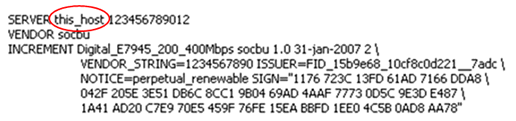
In the SERVER statement, replace the server hostname placeholder string this_host with the hostname of the license server.
The graphic below shows the server string to be replaced.
- Also in the SERVER statement, replace the server host ID placeholder string 123456789012 with the actual host ID of your license server (and optionally the port number of your license server).
Note: For more information about querying the license server hostnames and host IDs, see Find out HostID and HostName.
<host_name> = The license server hostname or IP address returned by the hostname command.
<hostid> = The string returned by the lmhostid command.
[port] = TCP/IP port number to use.If a port must be specified (check with your network administrator), the syntax is as follows:SERVER <host_name> <hostid> [port], for example:SERVER MyLicSvr 8502053d1905 27000-
VENDOR socbu [port], for example:VENDOR socbu PORT=27020
Note: If no port is configured, the client automatically checks all ports from 27000 to 27009. Any other ports must be specified.
Normally a license file has one SERVER statement. Three SERVER statements signifies that you are using a three-license-server redundancy configuration. See License clients and license servers. In a three-license-server configuration you must edit all three SERVER statement entries. - The VENDOR statement specifies the daemon name and should be as follows:
VENDOR socbu.
Client license files
To edit.lic license files on a client system:- Copy the
.liclicense file you received to the/opt/flexlm/license/directory on the client machine. - Open the
.liclicense file in an editor. - The SERVER statements specify the hostname and host IDs of the license server systems and the TCP/IP port number of the license server manager (lmgrd).
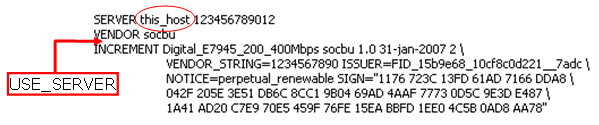
In the SERVER statement, replace the server hostname placeholder string this_host with the hostname of the license server.
The graphic below shows the server string to be replaced.
- Also in the SERVER statement, replace the server host ID placeholder string 123456789012 with the actual host ID of your license server (and optionally the port number of your license server).
Note: For more information about querying the license server hostnames and host IDs, see Find out HostID and HostName.
<host_name> = The license server hostname or IP address returned by the hostname command.
<hostid> = The string returned by the lmhostid command.
[port] = TCP/IP port number to use.
Normally a license file has one SERVER statement. Three SERVER statements signifies that you are using a three-license-server redundancy configuration. See License clients and license servers. In a three-license-server configuration you must edit all three SERVER statement entries. - The VENDOR statement specifies the daemon name and should be as follows:
VENDOR socbu. - The USE_SERVER line in the client license file ensures that the requested license features are obtained from the specified license servers. The license file on the client no longer needs to be in sync with the license file on the server and may even not contain any license information.
Enter the USE_SERVER statement. It takes no arguments.
Note: For standalone systems with a local license server, the USE_SERVER statement is not necessary as both client and server use the
/opt/flexlm/license/* directory. Therefore, the server license file automatically specifies the server for the client (<host_name> = localhost). - Optional: In the client
.licfile only, any license strings below the USE_SERVER keyword are ignored and can be removed. Only the licenses on the servers specified in the SERVER lines are read.