
Content
Subtopics
- What is an entitlement certificate?
- What is the expiration date of a license?
- What is a license?
- What is a license feature?
- What is a license product?
- Smartest license validity (master release date and date version)
- Is a license server on a virtual machine (VM) supported?
What is an entitlement certificate?
-
It is a document (HTML and/or paper copy) that is unique for each entitlement.
-
It is the legal proof of ownership. It is very important to keep it.
-
It is shipped together with the hardware product delivery as paper copy (if applicable), or sent by email for eDeliveries.
-
It contains information about entitlement lines / license products, the quantity and the expiration date.
Example for an entitlement certificate: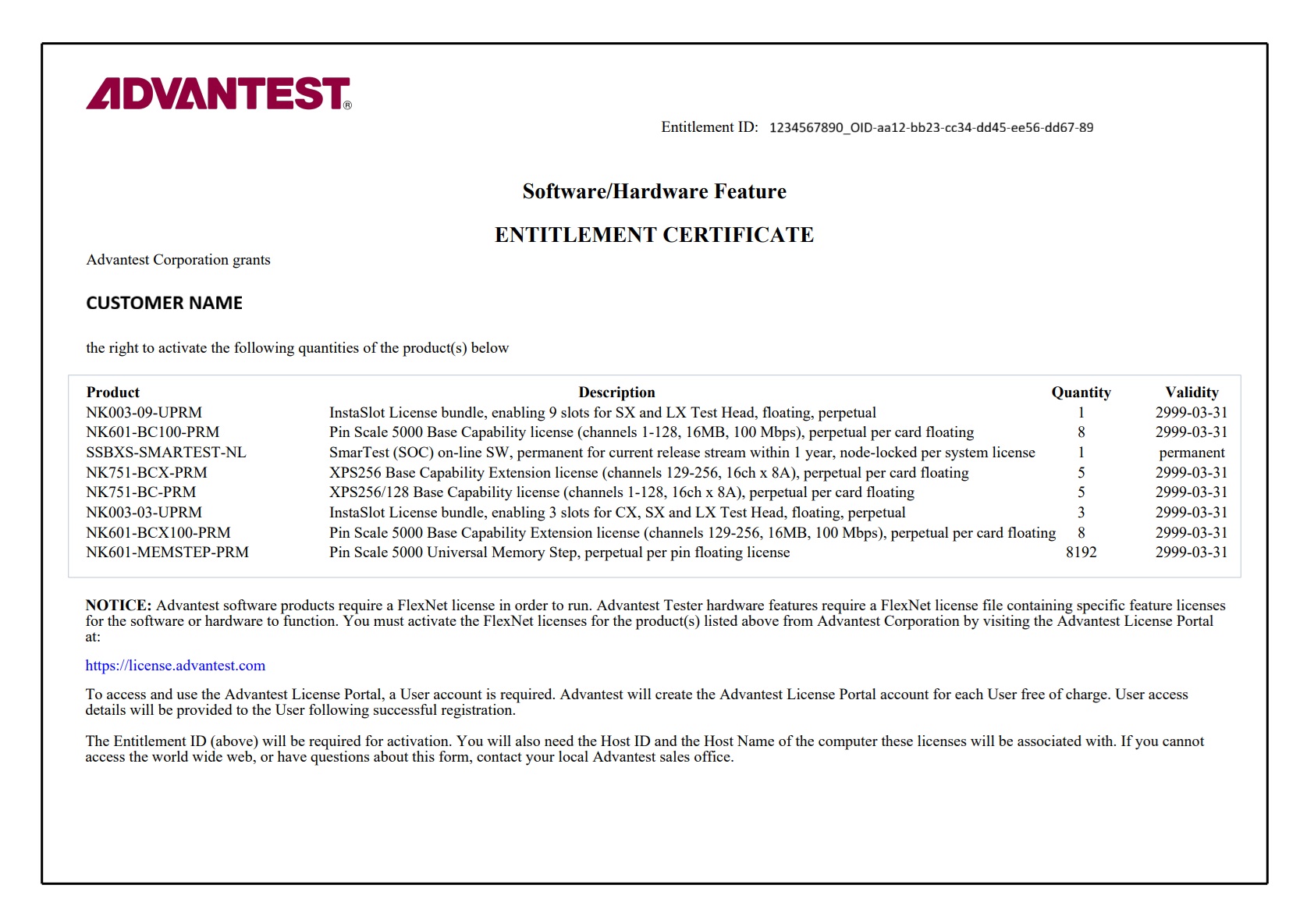
In the example above
- The entitlement ID can be found in the upper right corner. This is an important key, needed for license activation. This key should not be shared to other companies.
- The CUSTOMER NAME is printed on the entitlement certificate, which is the owner of the entitlement certificate.
- There is a line for each license product visible in the box. Each line contains the Advantest license product name like "NK003-09-UPRM", the product description like "InstaSlot License bundle, enabling 9 slots for SX and LX Test Head, floating, perpetual", the number of license product available like 1 in the column Quantity and the validity, which means when the license will expire. The date 2999-03-31 stands for 31st March 2999 and is called "permanent" as this date is far in the future.
- The NOTICE shows that access to the license portal is needed in order to activate the licenses on the entitlement certificate to a license server, so that the license can enable the appropriate software or hardware feature(s).
What is the expiration date of a license?
-
It is the date after which the respective license will no longer be valid.
-
If there is not an expiration date but the term “permanent”, then the license does not expire.
-
Examples for expiration dates:
-
31-Mar-2026
-
31-Mar-2999
If the license has this expiration date, it is called “permanent” as the year 2999 is far in the future.
-
-
At Midnight the license server checks the expiration dates and if a license expired, it is no longer available.
What is a license?
A license allows the use of a specific hardware or software capability.
What is a license feature?
-
It describes a technical functionality enabled by a license (bin) file
-
It consists of a name (= license string / string name) and a version number, e.g. Protocol_Aware_SOC, Version 1.0
-
Every feature of a license product has a specific count, i.e. quantity that can be used simultaneously
What is a license product?
-
It consists of a product name (= product number), a description and a set of features and their quantities
-
It describes an item that consists of a set of features.
Example:
License Product Name: N7050AOF
License Product Description: Pin Scale SmarTest off-line, permanent per session floating license
Feature: SmarTestOffline_SOC Quantity: 1
In the example above it is only one feature with quantity 1. There could be a set of features with different quantities under the same license product.
SmarTest license validity (master release date and date version)
The SmarTest SOC and HSM online licenses are valid for specific SmarTest versions.
On an FNE license server you can check the date version of the SmarTest license about the Features menu in the FNE server viewer:

Here the SmarTest license with feature SmarTest_SOC (column Feature) has the date version 2025.12 (column Version), which is the date December 2025. In column Expiry you see that the license is permanent and in column “Vendor String” you see for the serial number the value MY00012345, which means that this SmarTest license is bound to the tester with serial number MY00012345.
On an FNP license server you can check the SmarTest date version in the license file with the appropriate INCREMENT line. Example for such an INCREMENT line (excerpt):
INCREMENT SmarTest_SOC socbu 2018.11 permanent …
VENDOR_STRING=SERIALNUMBER:MY00098765 HOSTID=VSN=MY00098765 \
-
behind the keyword INCREMENT you find the feature SmarTest_SOC
-
behind the word
socbuyou find the date version 2018.11 (= November 2018). This "date version" determines which SmarTest versions can run with this license. If the master release date of the SmarTest version is ≤2018.11, then this SmarTest version can run with that license. -
the keyword “permanent” indicates that the license is permanent. This license does not expire.
-
the string SERIALNUMBER:MY00098765 after the keyword VENDOR_STRING is just text. For the FNP license server this text does not matter.
-
the string MY00098765 behind the keyword “HOSTID=VSN=” indicates that the SmarTest license is bound to the system serial number MY00098765. Therefore, this license can be only used by the appropriate tester with serial number MY00098765.
Note: the bounding (so called node-locking) to a system serial number has been introduced with SmarTest 7.
In the release notes of SmarTest you can find under „Installation requirements“> table entry “Licensing” or “License server” the master release date of that SmarTest version. Example for SmarTest 7.4.5.5:

-
The master release date of SmarTest version 7.4.5.5 is 2018.07 (July 2018).
-
with the FNP license example above (INCREMENT SmarTest_SOC
socbu 2018.11permanent ...) you can run SmarTest 7.4.5.5 of tester MY00098765 (master release date 2018.07 ≤ license date version 2018.11). -
with the FNE server viewer example above (it shows the date version 2025.12) you can run SmarTest 7.4.5.5 of tester MY00012345 (master release date 2018.07 ≤ license date version 2025.12).
Is a license server on a virtual machine (VM) supported
The license server setup on a VM is supported. Support details:
-
For a workstation based license server setup (“local” license server):
On an Advantest tester workstation with supported hypervisor/VM setup, the license server must run on the hypervisor for Z640 and Z4G4 workstation and on the VM for Z4G5 workstation. -
For a central license server setup (central license server, three-redundancy-license-server for FNP, failover system for FNE):
The customer server infrastructure can be based on any operating system providing the VM setup for the license server.
The used platform providing the VM is not supported by Advantest. The customer needs to take care.
The VM Operating System must be an Advantest supported Operating System for the license server software.
Advantest supports the license server software on this VM.
Cloning of licenses is strictly forbidden according to the Advantest terms of conditions.