FNE registration problems
Error "Connection to https://license.advantest.com/flexnet/deviceservices failed with exception"
Issue description:
The user tried command
register-fne-server <id>
with the appropriate <id> and got the following error message:
Failed to activate your server
\{
"key" : "glsErr.connectionFailed",
"message": "Connection to https://license.advantest.com/flexnet/deviceservices failed with exception: exception: error on POST request for \ \"https://license.advantest.com/fL
exnet/deviceservices\": Connection reset; nested exception is javax.net.ssl.SSLException: Connection reset,*
: [ "https://license.advantest.com/flexnet/deviceservices, I/0 error on POST request for \"https://license.advantest.com/flexnet/deviceservices\": Connec
tion reset; nested exception is javax.net.ssl.SSLException: Connection reset ]*
Background information:
The connection to license.advantest.com with port 443 was not really available, but for the FNE server software it looked like that a connection is possible, therefor it tried and failed.
Solution: Enter the line
0.0.0.0 license.advantest.com
to file /etc/hosts.
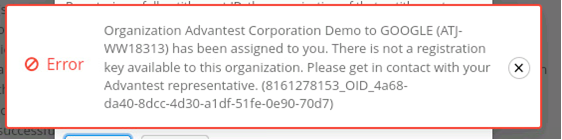
Error "No registration key available to this organization"
This error message can occur during the activation of demo licenses. Demo organizations do not have a registration key assigned. To obtain a valid registration key, the user must be assigned to an alternative organization within the same company that has a registration key available.