
How to use test_license_checkout tool
Prerequisite to run the tool on an FNE server:
FNE client SW (v93000-fne-client-<version> must be installed. You can run the tool without providing the path to the tool (available in the PATH variable and can be found for RHEL7 in /usr/bin as link and existing in /usr/local/bin and for RHEL9 in /usr/bin).
Which test_license_checkout parameters exist?
There are more parameters available. Please check with option -h the available parameters. Here only some parameters are listed.
-h : help
-f <featureName> : You have to provide the feature name of the license which shall be checked out. You have to take the feature name exactly as provided in the license file.
-t <time> : This is the time given in seconds how long the license shall be checked out. This is useful, if you can check in parallel on the license server, if the license is checked out on the correct license server.
-v : for the system serial number
-u : device / upstream owner
-d : for getting debug information
How to checkout floating license with specified number via test_license_checkout?
Example for checking out a specified number of floating licenses like Digital_E8012_TIA:
/opt/hp93000/soc/.service/bin/test_license_checkout -f 3 Digital_E8012_TIA -t 10
Here 3 floating licenses of Digital_E8012_TIA will be tried to checkout for the duration of 10 seconds.
How to checkout S&S licenses via test_license_checkout?
You need to use quotes because of the special sign &:
/opt/hp93000/soc/.service/bin/test_license_checkout -f "S&S_Tools_Package" -t 0
How to checkout a license with device owner via test_license_checkout (only available for FNE client or on the FNE license server)?
With fne-list-licenses and option --assetScale you can check the device owner and the licenses of the asset scale bundle.
Example output:
$ fne-list-licenses --assetScale
Server: FNX-redundant dedcbfnefelic1new/dedcbfnefelic2new
\-URL: http://dedcbfnefelic1new.adv.advantest.com:7070/fne/bin/capability
 100000 x Token_ADVANTEST_RD_WaferSort/1.0 starts 2019-05-02

           Locked to DeviceOwner=ADVANTEST_RD

           Content of AssetScale bundle:

              1 x ANALOG_E9723B_MEAS_4_8/1.0

            960 x Digital_E8012_1_50Mbps/1.0

            960 x Digital_E8012_100_200Mbps/1.0

            ...
Device owner in the fne-list-licenses is ADVANTEST_RD, which means that you need to run a test program which is locked to company ADVANTEST_RD. The token is Token_ADVANTEST_RD_WaferSort.
For test_license_checkout use option -u:
-u <name> : Set name of upstream / device owner
Example:
/opt/hp93000/soc/.service/bin/test_license_checkout -u ADVANTEST_RD -f Token_ADVANTEST_RD_WaferSort -t 0
The feature with option -f is used with the token name.
How to use debug option or SOCBU_DIAGNOSTICS with test_license_checkout?
If the checkout fails, please rerun the command with diagnostics enabled:
$ SOCBU_DIAGNOSTICS=7 /opt/hp93000/soc/.service/bin/test_license_checkout -f "S&S_Tools_Package" -t 0 > /tmp/lic-error.txt
How does a successful output with test_license_checkout look like?
/opt/hp93000/soc/.service/bin/test_license_checkout -f "S&S_Tools_Package" -t 0
Output:
Using FlexNetEmbedded 2021.05.0.279614 / subsystem 1.3 / built Nov  8 2021 15:34:51 (RPM)

Check out finished in 25ms for category tplf

OK    1 x S&S_Tools_Package/1.0

Sleep for 0 seconds...
How to easily check the FNE server registration with test_license_checkout?
With a standard installation the test_license_checkout tool is available on the FNE license server (primary and if existing, failover). With fne-status, you can check if it is installed:
Under installed components
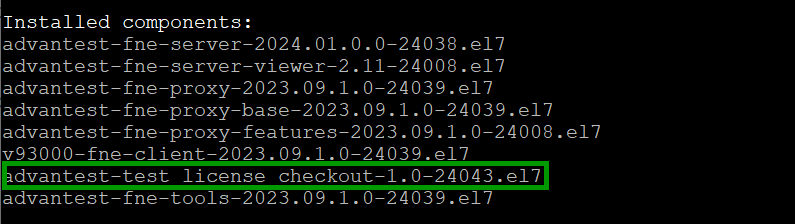
fne-status showing installed componentsAfter registration of a new FNE license server you can easily check the license checkout of the dummy license which is available after a successful registration.
Just enter:
test_license_checkout
on the command line. Default feature is the dummy feature, so you do not need to enter anything.
Example with output:

test_license_checkout checking out the dummy licenseThe dummy feature has been successfully checked out for 10 seconds (last two lines in the screenshot above).